


Known Participant
May 8, 2020 1:03 PM UTC
Question

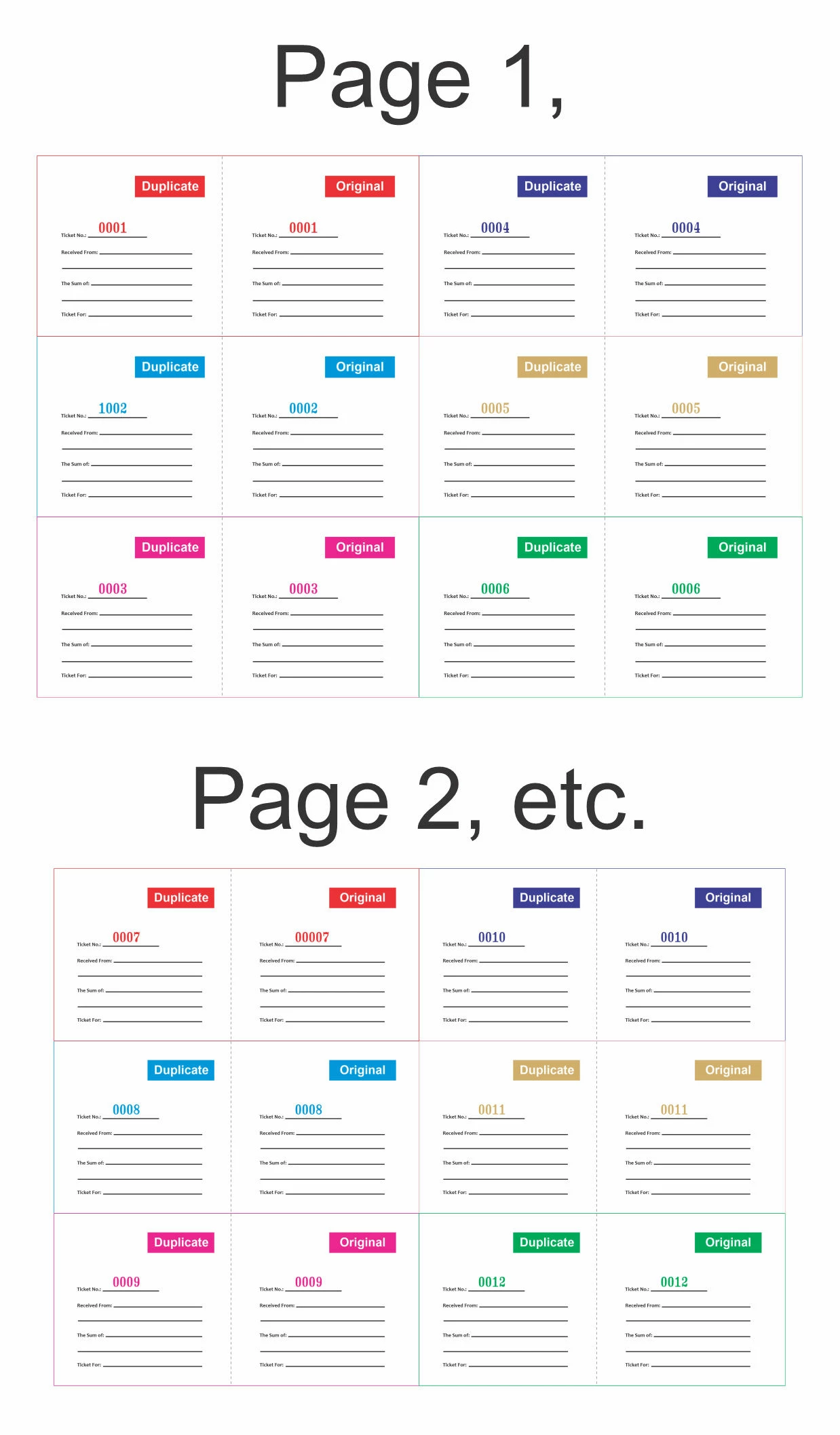
Please I need help to generate new serial numbers on a form during each print

Please and please i need help getting my following attached adobe form on my PC to generate new sequential serial numbers on the specified "Ticket Number" field on the form during each print. I print lots of copies of this template, during the production, i want the form to be able to generate serial numbers on the specific field just like the illustration attached. say i send 1,000 copies of the form to print, the numbers should be generated accordingly till the last copy.

Please i will appreciate any support to this request. Thanks
This topic is closed to new replies. Start a new post to keep the conversation going.

21 replies

Participating Frequently
May 12, 2020 8:49 AM UTC

Deoptic,
Maybe you could print locally first by selecting a pdf printer (such as doc.printerName = "Adobe PDF"), which quickly generates a pdf for you. Then print this pdf (flat) on the industrial printer. Printing on paper should be fast.

Tip: rearrange your code with Thomp's correction.

Translate
try67
Community Expert
Community Expert
May 12, 2020 9:02 AM UTC

Not that quickly, as you'll need to manually enter the name for each file...

Translate
Participating Frequently
May 12, 2020 10:08 AM UTC


hi try67,
but I understand that you can send silently to the printer to avoid asking for the file name.
Returning to the Thomp correction:
var start = 1;
var doc = this.getPrintParams ();
doc.interactive = doc.constants.interactionLevel.silent;
doc.printerName = "Adobe PDF";
doc.bUI = false;
doc.bSilent = true;

for (var nSheets = 0; nSheets <10; nSheets ++)
{
   for (var i = 1; i <= 12; i ++)
      this.getField ("Ticket_No_" + i) .value = util.printf ("% 04d", start ++);
      this.print (doc);
}

Before, "Adobe PDF" printer can be configured to indicate the path and not open the printed pdf.
With several printed pdfs you can use binder.

Translate
try67
Community Expert
Community Expert
May 8, 2020 2:37 PM UTC

Doing that requires using a script, and you can't use the Copies field in the Print dialog because that only prints identical copies of the file, so each print needs to be in a separate command.

Translate
Known Participant
May 8, 2020 3:27 PM UTC

Ok, thank you try67,

are you saying it can only work like the following?

Translate
Known Participant
May 9, 2020 5:29 AM UTC

There is a "Doc.print()" function. It uses the PrintParams Object. You can read about it and see sample code here:

https://help.adobe.com/en_US/acrobat/acrobat_dc_sdk/2015/HTMLHelp/#t=Acro12_MasterBook%2FJS_API_AcroJS%2FPrintParams_properties.htm


You'll probably want to break the number filling and printing into chunks, so the print job isn't too huge. For example, 10 pages of tickets, send the print job, then refill the 10 pages and re-print, etc.


Thanks, Thom_Parker, i have been going through the documentation, but the whole thing is still not clear to me as to how i can implement the instructions to get specifically what I want. Please, if i can get a much plainer example, I will be very grateful, I really need to do this. Once again, thank you so much for your time. It really meant so much to me right now.


Translate