
Participant
October 28, 2016
Answered

"Bold" will not toggle off

  • October 28, 2016
  • 1 reply
  • 10182 views

Hi

Regarding Acrobat Pro DC-

I am unable to toggle off the bold setting. This is happening when I add text or edit text. The text I am editing does not contain any bold characters.

Clicking on italics, subscript etcetera does not turn off bold. changing fonts does not help. It was working okay and then stuck in bold.

Don't know what changed or if I did something inadvertently. Right now I can't do the necessary edits on documents for work.

In the Lounge because I could not find a community for Acrobat Pro DC.

Please share your expertise.

Dave
This topic has been closed for replies.
Correct answer Cari Jansen

I've had a bit of a look at what could be the cause of the issue. My observations:

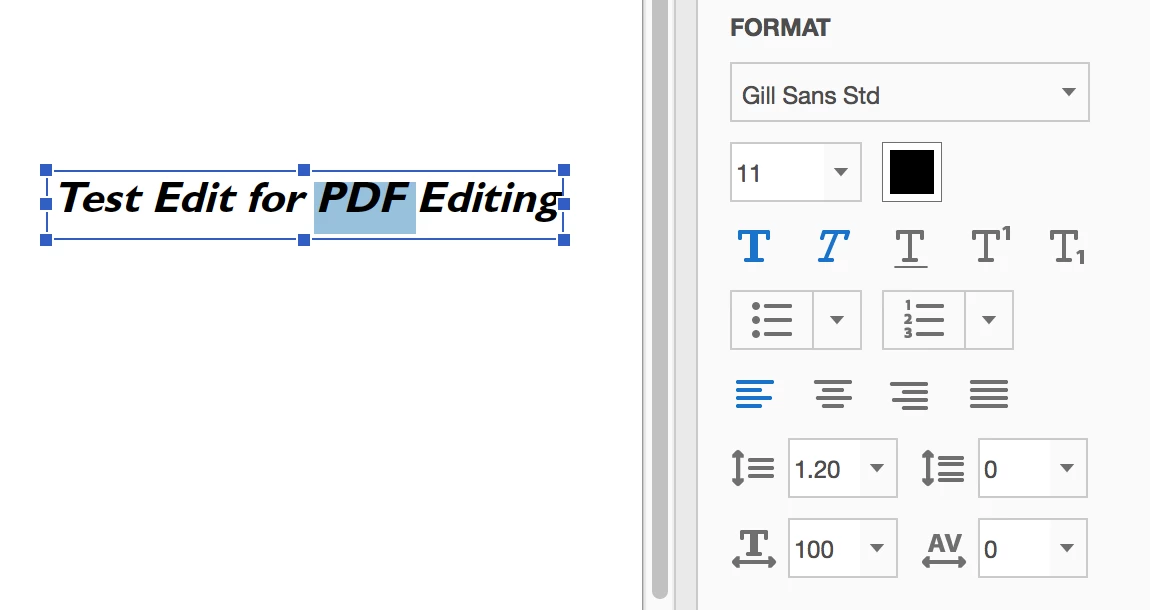
  • The Format font styles / settings remember the last settings you've applied to text edits in Acrobat. That means if you had applied  Bold +  Italic, these will remain active.  The next text you add with Add Text tool will hen have Bold + Italic applied as well.
  • If you ONLY insert the cursor (with Edit tool)  between two characters in the text, you cannot disable the Bold or Italic options that are active by default. You'd need to ensure you highlight/select some text first.

For the issue you are seeing:

  • Are you highlight/selecting text with the 'Edit' tool and then clicking on the Bold and Italic buttons under Format to try and disable it?
  • If you are and the issue persists, I'd opt to reset Acrobat's preferences to see if that resolves the issue.  (see: Re: How to reset Preference settings in Acrobat. )
  • Also does the problem occur just in one PDF or all PDFs you try to edit?

Cari

1 reply

Legend
October 28, 2016

Could it be that the font you've selected only has a Bold appearance? This might be something you've already tried - but does it work if you select another font?

Are you able to provide a screenshot of the Edit PDF panel with the text selected on the page? Might be something we can spot quickly and help sort.

Cari

Participant
October 28, 2016

Cari JansenCorrect answer
Legend
October 31, 2016

I've had a bit of a look at what could be the cause of the issue. My observations:

  • The Format font styles / settings remember the last settings you've applied to text edits in Acrobat. That means if you had applied  Bold +  Italic, these will remain active.  The next text you add with Add Text tool will hen have Bold + Italic applied as well.
  • If you ONLY insert the cursor (with Edit tool)  between two characters in the text, you cannot disable the Bold or Italic options that are active by default. You'd need to ensure you highlight/select some text first.

For the issue you are seeing:

  • Are you highlight/selecting text with the 'Edit' tool and then clicking on the Bold and Italic buttons under Format to try and disable it?
  • If you are and the issue persists, I'd opt to reset Acrobat's preferences to see if that resolves the issue.  (see: Re: How to reset Preference settings in Acrobat. )
  • Also does the problem occur just in one PDF or all PDFs you try to edit?

Cari