


Copy link to clipboard
Copied
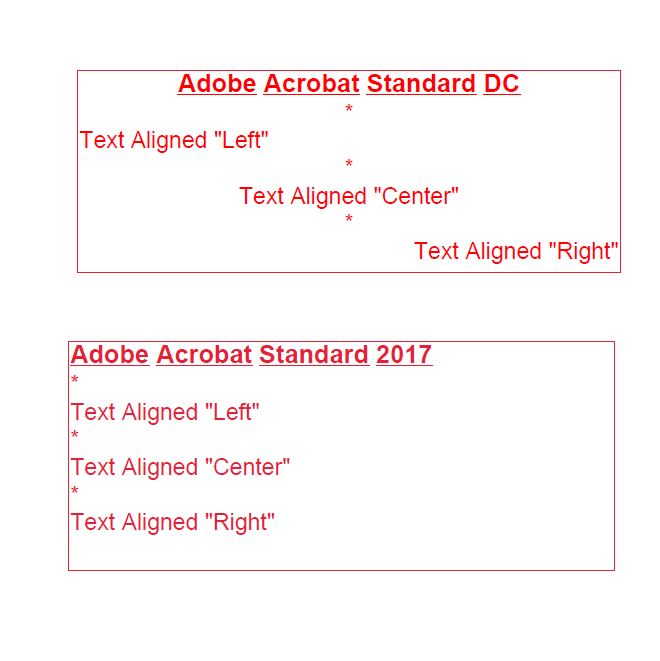
I have attached a JPG which shows the alignment
issue I am experiencing with Adobe Acrobat Standard 2017. These issues do not
exist in Adobe Acrobat Standard DC or earlier versions.
The top text box was created using Adobe Acrobat Standard DC.
Each line of text can be aligned individual. I.e. “Center”,
“Left” or “Right”
The bottom text box was created using Adobe Acrobat Standard
2017.
Each line of text can NOTbe aligned individual. All lines have to be aligned the same,
either, “Center”, “Left” or “Right”
Another annoying issue is with the newer text property box
that will pop up automatically when editing text within the text box.
1 – it positions itself in the upper right corner of the
document you’re working on. Covering the item your editing. Unlike the older text property, Control “E”,
the newer text property cannot be repositioned.
2- The standard color pallette of the new text property do Not match the older Control “E”


 Correct answer by
Ed_Bobo
AUTHOR
Correct answer by
Ed_Bobo
AUTHOR
Copy link to clipboard
Copied
The text boxes where created as new “PDF” documents on 2 separate computers. Both computers are running Windows 10 Pro and have all current updates installed. Once created the images where pasted into one jpg file.
Computer 1: The text box, where each line of text can be aligned independently (preferred) was created using Adobe Acrobat Standard DC, version 2015.006.30394 (system info 15.6.30394.253961). All current updates have been installed
Computer 2: The text box, where each line of text can NOT be aligned independently was created using Adobe Acrobat Standard 2017, version 2017.011.30070 (system info 17.11.30068.251704). All current updates have been installed.
 4
Replies
4
4
Replies
4


Copy link to clipboard
Copied
Hi Ed Bobo,
Check if an update is available for Acrobat by clicking check for updates under Help menu. You may also download updates manually using this link: DC Release Notes — Release Notes for Acrobat DC Products
If that doesn't work, try repairing Acrobat by going into Help menu > repair installation, reboot the machine and try again.
Have you tried adding text box to a different pdf file to check if its not a file specific issue?
Could you let us know Acrobat Standard 2017's dot version and operating system installed on the machine? You may refer to this link on how to check the version: Identify the product and its version for Acrobat and Reader DC
Thanks,
Shivam
Correct answer by
Ed_Bobo
AUTHOR
Copy link to clipboard
Copied
The text boxes where created as new “PDF” documents on 2 separate computers. Both computers are running Windows 10 Pro and have all current updates installed. Once created the images where pasted into one jpg file.
Computer 1: The text box, where each line of text can be aligned independently (preferred) was created using Adobe Acrobat Standard DC, version 2015.006.30394 (system info 15.6.30394.253961). All current updates have been installed
Computer 2: The text box, where each line of text can NOT be aligned independently was created using Adobe Acrobat Standard 2017, version 2017.011.30070 (system info 17.11.30068.251704). All current updates have been installed.
Copy link to clipboard
Copied
Hi Ed Bobo,
We are aware of the issue and our team is working on the resolution, appreciate your patience.
-Shivam
Copy link to clipboard
Copied
Thank you for your reply. I look forward to these issues being resolved so I can use Adobe Acrobat Standard
2017. Sincerely, Ed.


Get ready! An upgraded Adobe Community experience is coming in January.
Learn more
 AdChoices