
Inspiring
August 1, 2016
Answered

Where did Adobe hide the TouchUp properties in Acrobat Pro 2015?

  • August 1, 2016
  • 3 replies
  • 2073 views

I found something similar in the Redact toolbar, but I can't get it to show me the properties of selected text.

I'm using the Mac version.

Good think I have an old copy of Acrobat 8 on one of my systems so I can get my work done.
This topic has been closed for replies.
Correct answer rlauriston

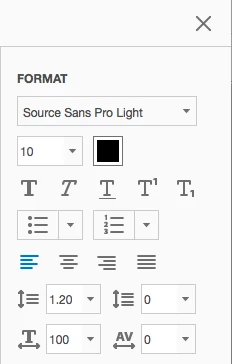
I found it. Click Edit PDF, select some text, and the properties appear in the sidebar.

3 replies

rlauristonAuthorCorrect answer
Inspiring
August 1, 2016

I found it. Click Edit PDF, select some text, and the properties appear in the sidebar.

Inspiring
August 1, 2016

I don't want to edit anything, I just want to see the properties for selected text. This is the dialog in Acrobat 8:

Karl Heinz  Kremer
Community Expert
Community Expert
August 1, 2016

What specific TouchUp are you referring to? Most of the former TouchUp tool's functions are in the "Edit PDF" category. Here you can edit text (font, size, color) or images. The TouchUp Reading Order tool is in the Accessibility group of tools. You can use the tool's search feature to locate tools that you are looking for.