Exit
  • Global community
    • Language:
      • Deutsch
      • English
      • Español
      • Français
      • Português
  • 日本語コミュニティ
  • 한국 커뮤니티
0

Ecoding Error with Latex PDF

New Here ,
Oct 22, 2017 Oct 22, 2017

I converted a PDF created with pdflatex with the ExportPDF online tool. All PDF readers have no problem viewing the PDF file but the resulting *.docx file contains weird characters.

As an minimal example: This is a latex file

\documentclass{article}

\usepackage[utf8]{inputenc}

\usepackage[T1]{fontenc}

\begin{document}

Über

\end{document}

creating a simple pdf with only the german word "Über".
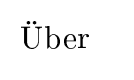
Capture2.PNG

After converting with ExportPDF MS Word displays those characters.

Capture.PNG

What could cause this? Any idea how to fix this?

1.1K
Translate
Report
Community guidelines
Be kind and respectful, give credit to the original source of content, and search for duplicates before posting. Learn more
community guidelines

correct answers 1 Correct answer

New Here , Oct 26, 2017 Oct 26, 2017

It seems that exportpdf is not able to handle the default font "Computer Modern" of latex. I suppose the only fix is use a different fontfamily.

Translate
New Here ,
Oct 26, 2017 Oct 26, 2017
LATEST

It seems that exportpdf is not able to handle the default font "Computer Modern" of latex. I suppose the only fix is use a different fontfamily.

Translate
Report
Community guidelines
Be kind and respectful, give credit to the original source of content, and search for duplicates before posting. Learn more
community guidelines

