
Participant
August 6, 2015
Answered

Password question

  • August 6, 2015
  • 1 reply
  • 488 views

I am considering using Adobe DC for a research study consent form and have a few questions. Once the consent form is emailed, is there a way to monitor who is able to open the consent form (i.e., does the recipient need a special code/password to open it)? Also, is a password needed to make it a legal signature?
This topic has been closed for replies.
Correct answer NakulB

Hello,

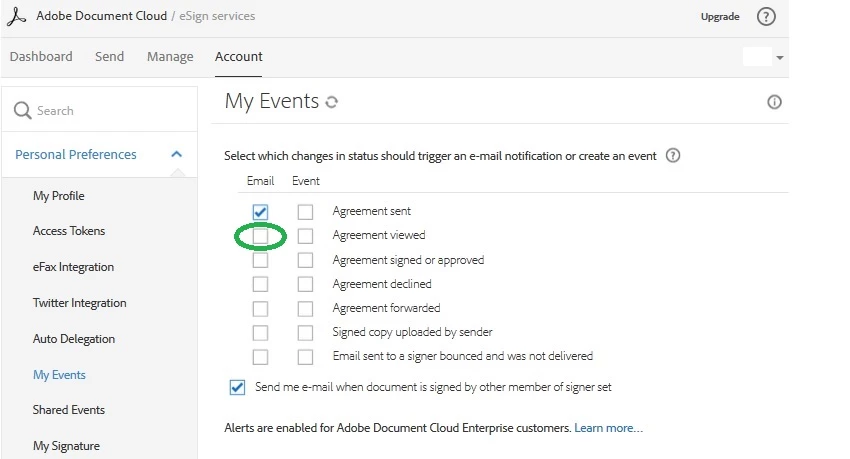
In order to monitor the transactions, you can setup email notifications in your account.

Please follow the steps mentioned below:-

- Login to your Document Cloud account

- Go to Account tab

- My Events

- Check the email box

Also, it is not necessary to password protect a document. Signer will only be prompted for a password, if you (sender) setup a password to access the document.

Please let me know if this was helpful.

Regards,

Nakul

1 reply

NakulBCorrect answer
Adobe Employee
August 11, 2015

Hello,

In order to monitor the transactions, you can setup email notifications in your account.

Please follow the steps mentioned below:-

- Login to your Document Cloud account

- Go to Account tab

- My Events

- Check the email box

Also, it is not necessary to password protect a document. Signer will only be prompted for a password, if you (sender) setup a password to access the document.

Please let me know if this was helpful.

Regards,

Nakul