


Known Participant
November 29, 2022
Question

Size of signature block

  • November 29, 2022
  • 1 reply
  • 1056 views

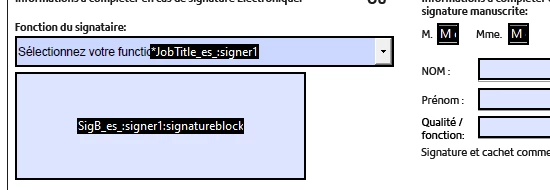
I've created a form in Acrobat and added all the required fields. The document also contains the standard signature block. When the document is sent to the customer for signature, the signature block covers other text on the page which isn't acceptable. What can I do to ensure the signature block stays where I've placed it?

If it's a size issue, what size is the standard signature block because I can't find this information anywhere!


This is what it looks like in the document:


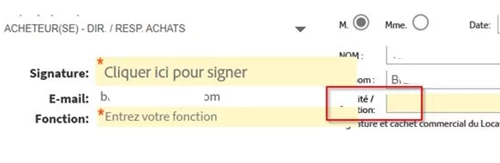
This is what the customer sees when they complete the document. You can see where the fields cover the text
This topic has been closed for replies.

1 reply

Meenakshi Negi
Community Manager
Community Manager
November 30, 2022

Hi jlehane,


Thank you for reaching out.


If you have added the form fields in Acrobat using the Prepare Form tool, then after uploading the document to Acrobat Sign, ensure that you check the fields once. On the send page, mark the box for Preview & Add signature fields.

Then check how the form fields appear there and align them as required.


Let us know how it goes or if you experience any issues.


Thanks,

Meenakshi

jlehaneAuthor
Known Participant
November 30, 2022

Thanks for your reply Meenakshi, but unfortunately this doesn't help!

Firstly, the sales reps who send this document out are instructed not to touch any of the fields on the document because they fields are already in place as per the first screen shot above. They just upload it and send it.

I have however, just followed your guidelines and whle I can move the signature block, I can't reduce the size of it and it's the size of the block that is the problem 😞

Looks like I'll have to alter the original layout instead.

Thank you anyway