
Participant
October 31, 2018
Question

Sofia Pro Soft - All weights are 400

  • October 31, 2018
  • 1 reply
  • 3041 views

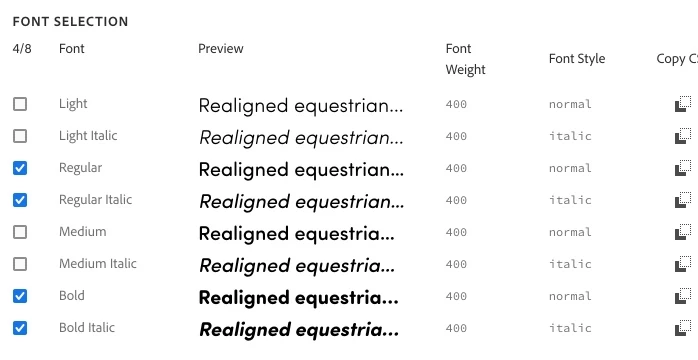
I want to add  Sofia Pro Soft in normal and italic light, regular and bold to a web project. However all the font weights are listed as 400. Did not have this issue with Typekit interface with same Typeface. Very frustrating.
    1 reply

    liz, Adobe Type
    Community Manager
    Community Manager
    October 31, 2018

    Sorry about that–we will get it fixed.  Here are the correct font weights for Sofia Pro Soft:

    Light & Light Italic

    font-weight: 300;

    Regular & Regular Italic

    font-weight: 400;

    Medium & Medium Italic

    font-weight: 500;

    Bold & Bold Italic

    font-weight: 700;

    I hope that this helps; let me know if you have any other questions. (Moving this post to the Adobe Fonts forum)

    -- liz

    Participating Frequently
    March 13, 2024

    We are having similar issues with Sofia pro where Semi bold is showing up as 700 (not 600) within Figma. We contacted figma and they verified that the meta data shows 700, but on Adobe fonts is says 600. We have a similar issue where Jubilat is wrong as well.


    Participating Frequently
    March 19, 2025

    Thanks for this and after looking at it some more it looks like font smoothing needs to be enabled. It seems that fonts are automatically antialiased within Figma so our design were not matching on our website also because we didn't have font smoothing enabled.


    As you can see in the attached image the weight is very different when font smoothing is on or off. I would recommend adding this to the font details on fonts.adobe.com as an optional setting.


    @Tarun Saini since you were able to assist me in regard to this font in the past I was wondering if you could anwser another questions. Do you know what version of Sofia is within the Adobe Font library? I see myfonts.com shows version 4.002 on their site, but I don't see a version number on Adobe. The issue is the font has verttical alignment issues and has been documented in another community post. I have contacted the font author, but I also want to verify what version we are using via Adobe.

    Thanks


    https://community.adobe.com/t5/adobe-fonts-discussions/css-embed-flex-box-align-items-center-font-alignment-inside-line-height-is-wrong-adobe/td-p/10662161