

Tim Andrews
Participating Frequently
February 18, 2021
Question

Typekit fonts not rendering properly on PC browsers

  • February 18, 2021
  • 3 replies
  • 3567 views

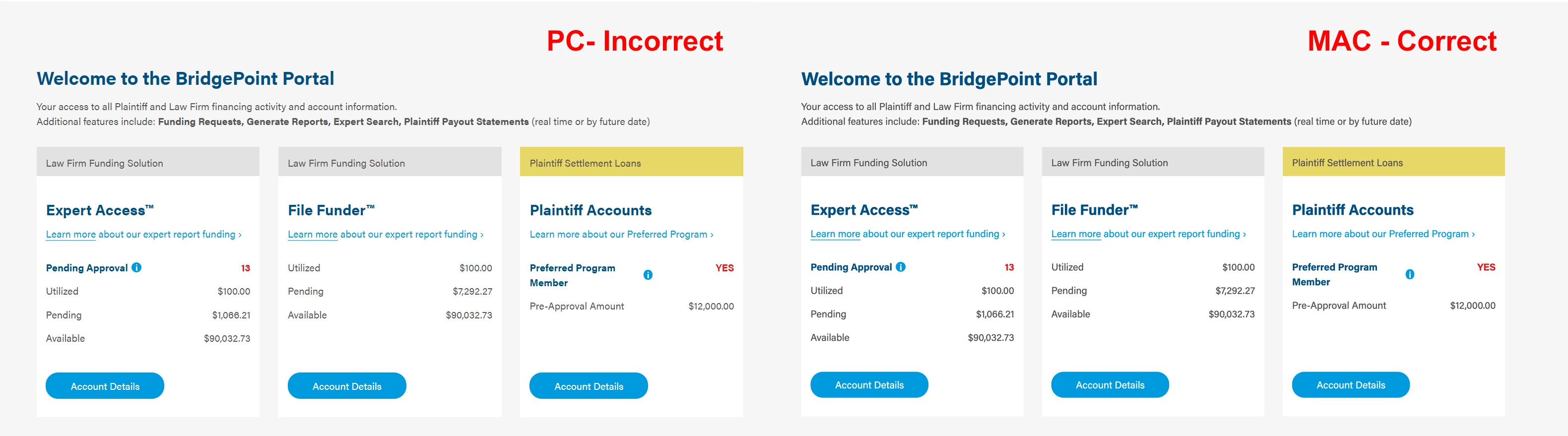
I am using Acumin Pro for a website. The font appears correctly on Mac browsers but does not on PC browsers. I have reviewed the community and searched Google but to no avail.


Moved to Adobe Fonts community. This is not a general Type & Typography issue!

    3 replies

    Participant
    July 4, 2023

    I have faced another cross-OS rendering issue with this font. It has different vertical positioning. On Windows it more offset to bottom. And on macOS more to top. No matter what browser on both OS. I appear on the website that I'm developing and on a randomly found font website.
    The first one is macOS, the second one - Windows. 
    Background color has directly H1 tag.


    So, if you have some rectangle, like a button, and it has equal top/bottom paddings it will be look different on macOS and Windows. 
    Here is an example of issue on my website. Same styles, but different look.
    MacOS:


    And Windows:

     
    Kind request, do not write that you can't see difference)

    Best regards, Pavlo!

    impelling
    Participant
    November 21, 2023

    There is clearly a problem with this typeface from Adobe. There is an obvious difference between how the font is rendered in XD and in the browser on the same OS. In this case, Windows 11.


    See the screenshot below. Both Acumin Pro, bold, 20px. Left is in chrome, and right in XD. (Both at 100% zoom levels)


    As a web developer myself, I do sweat the small stuff - and when receiving a design file to work from, from a designer, I want to do the best I can for the client to get the final product matching the design.

    Participant
    August 13, 2021

    My team has noticed the same issues with Acumin Pro on Windows browsers. The issues are most noticeable when using smaller (<= 20px), bold text.


    Here is an example that has especially poor legibility on Windows. This text is using Acumin Pro 14px bold (Firefox browser):


    Here is the same example on MacOS (Firefox):


    Note: On Windows, the numbers 5 and 6, and letter "s" lose whitespace within the character.


    Nancy OShea
    Community Expert
    Community Expert
    August 13, 2021
    Participant
    August 13, 2021

    Thank you for providing these links. Unfortunately, I have tried using the techniques found in these references, such as the CSS "text-rendering" property. I have also tried using different font file formats (svg, ttf, woff, woff2) and adjusting the ClearType settings in Windows. The CSS "font-smooth" property is only supported by MacOS and has no effect on Windows. Adjusting font-size or font-weight is the only way I have found to avoid the issue. And to tell a designer to avoid 12-14px bold text of a font entirely is not an appropriate solution. Not all other fonts (system or non-system) suffer this issue – which makes me wonder whether it is due to how the Acumin Pro font has been designed. I understand that a font will never render exactly the same across browsers and operating systems, but this issue, in my opinion, goes beyond minor rendering differences and affects the legibility of the font using common styles on an entire operating system.

    Here is another example of the issue (latest Chrome on Windows 10), this time showing the differences in a bold heading from 19px to 22px. Whereas the 19px bold heading has all character shapes intact and appears ok, the 20px heading characters have a significant degradation of legibility.


    Dov Isaacs
    Legend
    February 18, 2021

    What browsers on each platform? And since your examples are rather low resolution and fuzzy-wuzzy, can you please be specific as to the differences you see? Thanks!


    - Dov Isaacs, former Adobe Principal Scientist (April 30, 1990 - May 30, 2021)
    Tim Andrews
    Participating Frequently
    February 23, 2021

    If you click on the image in the message, it should enlarge to higher resolution. If that doesn't work for you, I can attached another version.

    On PC browsers the font is not appearing as it should. The outlines are chunky and pixelated at all font sizes - points to a rendering issue. Thanks.


    Tim Andrews
    Participating Frequently
    February 26, 2021

    Following up on this support post on Acumin Pro not rendering properly on PC browsers.