March 6, 2017
Question

AME not using all available RAM

  • March 6, 2017
  • 1 reply
  • 456 views

Hi there,

I have the following problem:

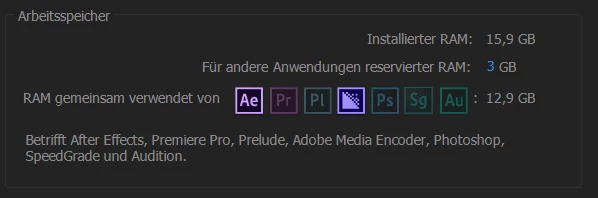
When ever I start to render something with AME (wheather from Premiere or After Effects) the program doesn't use my full RAM capacity, even I allowed the Adobe programms to use it in the preferences.

See these pictures, taking during a rendering-process:
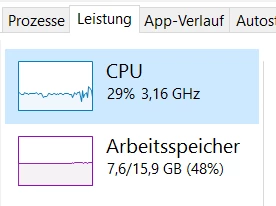
It doesn't depend on rendering settings.

I'm using a Windows 10 Lenovo P50 laptop. Intel Core i7.

I am assuming that my render process could run faster with the not used 5GB RAM, am I right?

Can somebody help me?

Thanks very much in advance.

Regards,

Christoph

This topic has been closed for replies.

1 reply

kulpreet singh
Inspiring
March 7, 2017

Hi Christoph,

What is the source & properties of your source footage?

What all inbuilt effects & 3rd party effects are you using in your project?

What are your export settings?

Thanks,

Kulpreet Singh

March 7, 2017

Hi Kulpreet,

thanks for your answer.

I just ran another test and found out that the RAM availbility is like this not only during a rendering process, but also when I'm just working with Premiere or After Effects.

I made you another screenshot form the ressource monitor:

Here it says, that ~4BG are in Stand by. Stand by for what?

Im Premiere I normaly use DSLR footage with AVCHD or H264-Codec togehter with Soundfiles, Photoshop-grafics or some generic After-Effects-content

No 3rd party plugins. Normally I use some color-correction or blur effects. Nothing special.

I usually export to H264-Codec

Do you need to know something more?

Thanks for your help!

Best Regards,

Christoph