Chris Panny
Inspiring
June 22, 2017
Answered

Convert Mp4 Video to MJPEG

  • June 22, 2017
  • 1 reply
  • 20924 views

I made a PowerPoint 2016 slide show that needed to be converted to MJPEG so it can display on an HD television. The tv only supports this video format. PowerPoint doesn't support exporting to mjpeg directly so I exported my PPTX file to mp4, hoping I could convert this with Media Encoder. I opened ME but I don't see the mjpeg format in the Format drop-down in the Export Settings.

Can anyone recommend a reliable way to convert mp4 over to MJEG?
This topic has been closed for replies.
Correct answer Warren Heaton10841144

MJPEG as in Motion-JPEG A or Motion-JPEG B, right?

As far as I'm aware, Motion-JPEG A and Motion-JPEG B are only available inside a QuickTime file.

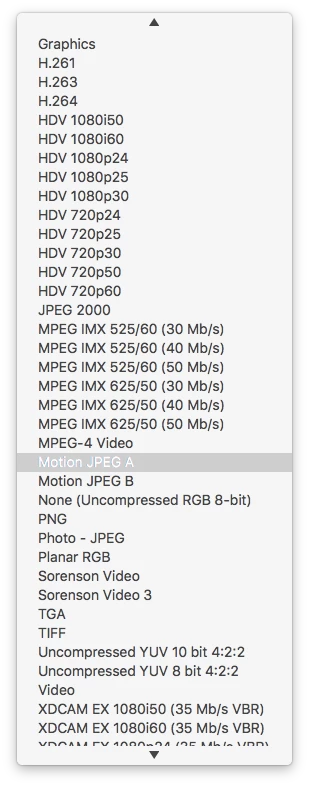
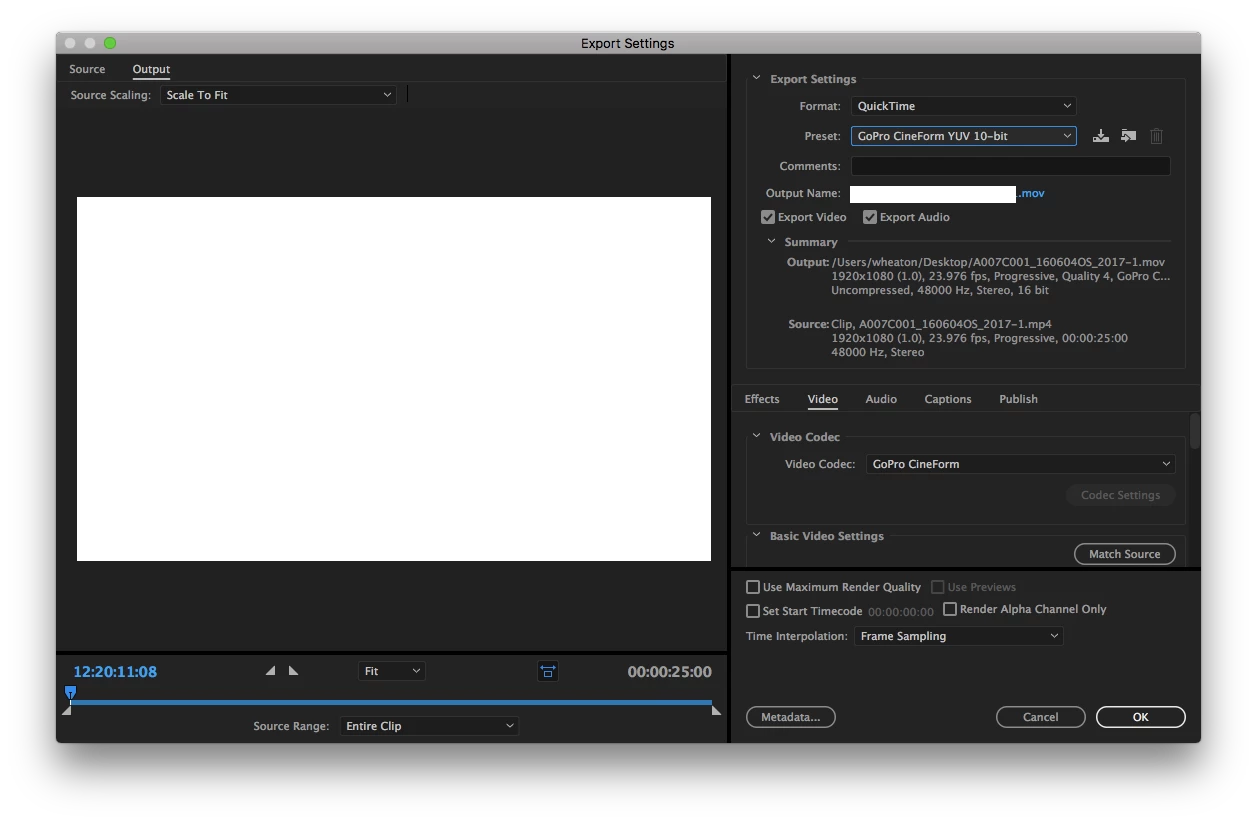
So, set the Format to QuickTime, set the Preset one of the GoPro presets, then go down to the video tab and change the Video Codec from GoPro CineForm to Motion-JPEG A or Motion-JPEG B.

If I remember correctly (I haven't used either of these since the mid-1990s), these are for SD fame sizes and require a field setting.

-Warren

1 reply

Warren Heaton10841144Correct answer
Braniac
June 22, 2017

MJPEG as in Motion-JPEG A or Motion-JPEG B, right?

As far as I'm aware, Motion-JPEG A and Motion-JPEG B are only available inside a QuickTime file.

So, set the Format to QuickTime, set the Preset one of the GoPro presets, then go down to the video tab and change the Video Codec from GoPro CineForm to Motion-JPEG A or Motion-JPEG B.

If I remember correctly (I haven't used either of these since the mid-1990s), these are for SD fame sizes and require a field setting.

-Warren

Chris Panny
Inspiring
June 23, 2017

Hi Warren,

Thanks for your reply and screenshots. I didn't have quickTime installed on my Windows 10 machine because Apple no longer supports it. When I followed your steps for loading the MJPEG codec in Media Encoder, my list was much shorter with options. I went ahead and installed QT and after which, I did see the option for the motion jpeg codecs.

Big thanks for you help!

It's only an island if you look at it from the water.
johnt53984649
Inspiring
July 1, 2019

I installed Quicktime 7.7.9 from here: Download QuickTime 7.7.9 for Windows

and these are the only options that I get in Media Encoder CC 2019 (as well as Premiere Pro CC 2019):

IZxUr6f.png

How did you get the MJPEG codecs to show up?  Am I missing a step?