Participant
March 15, 2022
Answered

P: Extremely Slow Render/Export on Adobe Media Encoder 2022

  • March 15, 2022
  • 463 replies
  • 124822 views

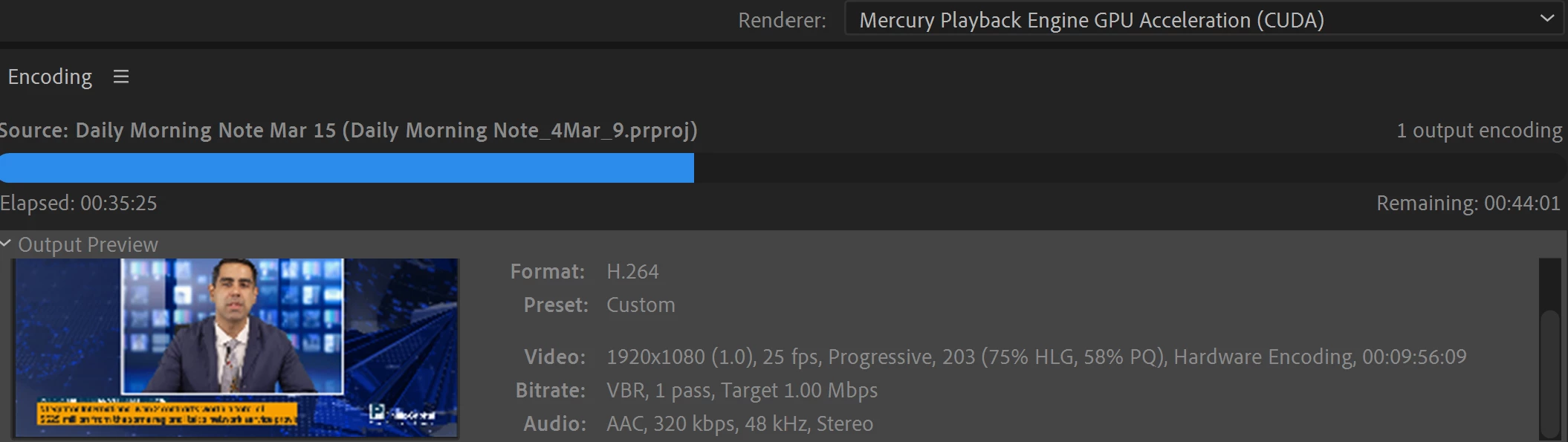
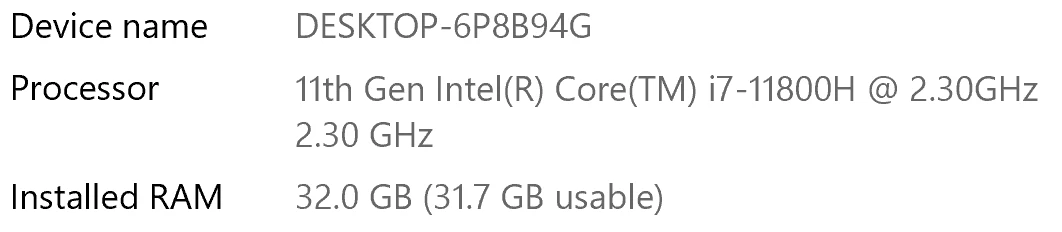
I have been waiting for more than 30 mins for the final video to be rendered. It's already 40 mins and it's barely 50% rendered. Never had this issue before. My laptop specs are as below and my GPU is RTX 3070.


Anyone knows how to solve this sudden issue?


Correct answer Fergus H

Hi all, 
Despite receiving test files from many of you (thank you!), we have not been able to reproduce this problem at Adobe. That's a bit unusual and certainly frustrating - to you and us - but we do think this issue has been fixed in the latest beta of After Effects and Media Encoder. We'd love to get your feedback on that. Creative Cloud betas are specifically designed to run alongside the release versions and are available in the "Beta apps" section of Creative Cloud Desktop. More information is here: https://helpx.adobe.com/x-productkb/global/creative-cloud-beta.html

The v23.x beta of After Effects also has the ability to directly export H.264 - without having to use Media Encoder - so your feedback on this would be useful too. More information is available here: https://community.adobe.com/t5/after-effects-beta-discussions/feature-focus-exporting-h-264-from-the-after-effects-render-queue/td-p/13117618


Regards,

Fergus

463 replies

moonmonkey2012
Participant
November 18, 2025

I have a very weird experience with Media encoder as of the 2024-25 updates.

The first render exports at a decent time in the queue, but each subsequent render that follows progressively gets longer.


I did a test rendering the same video multiple times in the media encoder queue. The first render for a 25min video was about 34mins. The same video directly after that rendered in about an hour 15mins and render after that 2+

Participant
November 19, 2025

Same here. I had to transcode drone footage, the first few (all similar lengths) took 2-5 mins, and then the rest slowed down until after 8 hrs now, they aren’t done. The same length from earlier that should have been 2-5 mins are now 45-65 minutes.

Frederic Bussiere
Participant
June 23, 2025

on my side it was "Resolume DXV" plugin that was slowing down the whole thing.

found in C:\Program Files\Adobe\Common\Plug-ins\7.0\MediaCore\Continuum Plug-ins

EckiAME
Community Manager
Community Manager
June 26, 2025

Thanks for letting us know.

Participant
May 11, 2025

Just wanted to contribute that I'm experiencing the same issue.  I upgraded PP to 25.2.3 and AME took unexpectedly long to process a 1 hour video on my machine...over 24 hours.  Rolled PP back to 25.1 and everything ran as expected.  AME version is 25.2.  No other settings changed between attempts.

Inspiring
May 11, 2025

When you rolled PP back to 25.1 did you roll back AME as well?  Or did its version remain unchanged (25.2)?


In other words, does the PP version determine whether AME is slow or not?  (rather than the AME version)?

May 11, 2025

No, he didn't. He only changed the versions of the PP.

Participant
April 2, 2025

Same issue. 25.1 was working fine yesterday. 25.2 is extremely slow and I get a notification that it's using too much CPU to have proper playback in Premiere. 

Terrible update.

Participating Frequently
April 24, 2025

Have you tried PP 25.2.3 yet?  I'm still on 25.1, just realized I missed some updates. Man it would be AMAZING to get this issue resolved... 

Known Participant
April 25, 2025

Everything seems to be working with this latest release. I have the Lumetri layers added to my timeline exported a 1hr 30mins project out to Media Encoder and completed in 1hr 30mins. I also have Boris FX plugins added to some of the clips, which can slow down rendering.

So all good this end at last! 😉

Participant
March 29, 2025

I wanted to add to this thread that both my machines have the same problem. M4 pro iMac (maxed out) and the M4 max MacBook Pro. It doesn't matter whether I use media that's ProRes 422, CRAW, h264, etc. whenever I export (usually to h264, mp4, 35MB, hardware encoding) render times are hours on fairly simple edits that would normally take 10-15 mins tops with previous versions of premiere/ame (they all have lumetri adjustment layers). 

On top of all this, adobe constantly flags my app/sends emails/forces password resets because they now say I can't use the software on two computers unless I log out of creative cloud entirely before moving to my laptop from a desktop or vice versa. 

Within one year adobe has massively cut my productivity down because of the constant issues. 

Participant
March 29, 2025

*that should say Mac mini not iMac 

Participant
March 14, 2025

Hello everyone, I seem to have fixed the issue. Not really sure why this worked maybe a smarter person can explain. When exporting to h264, I changed the target bitrate from the default 10, to around 20 mbps. Its also set at hardware encoding, VBR 1pass. File is twice the size but the export time is just as fast as ME 2024. 

Participating Frequently
March 22, 2025

Interesting! I will have to try this if Adobe can't get us another update soon. @EckiAME Any news?

Participant
March 14, 2025

Encoder taking 2-3x longer to export. What took 4min in 2024 now takes 12min. Going back to 2024 workflow. 

Participant
March 11, 2025

I'm still having this issue - Renders that should take less than a minute are dragging over 45min. Torture.


What is going on Adobe I'm having so many random issues with lots of your products. Please get some skilled members back on your team.

Participating Frequently
March 10, 2025

By the way, the beta of AME made things worse. Render time jumped from 30 mins in v25.1 to 2 hours in beta.

Also, why has this been marked as answered?? Now it doesn't show up in the post list...

- Tyler S.
FabioBarros
Participant
March 10, 2025

I had a similar issue but in Premiere Pro, was working on a project in PP 2024 and I just updated to 2025 now. I had this problem exporting 4K HEVC, almost endless render times... fixed it by copying the all the content of my timeline to a new sequence in a new project created in PP 2025.

I'm assuming the problem is somewhere in the automatic conversion Premiere Pro does when updating project files to 2025. Maybe it will work for AE?

Participating Frequently
March 10, 2025

@FabioBarrosUnfortunately the project files in my case were created using AE 2025. Are you queueing to AME or exporting straight out of Premiere?

- Tyler S.
FabioBarros
Participant
March 13, 2025

Exporting in PP was and is working fine, I was queueing to Media Encoder because I needed to batch render several videos.