ti.s.cavalcanti
Inspiring
January 22, 2015
Answered

How to render Alpha + RGB in Adobe Media Encoder?

  • January 22, 2015
  • 3 replies
  • 297708 views

I want to render a video.

Alpha;

RGB;

Alpha + RGB;

I can do in After Effects:
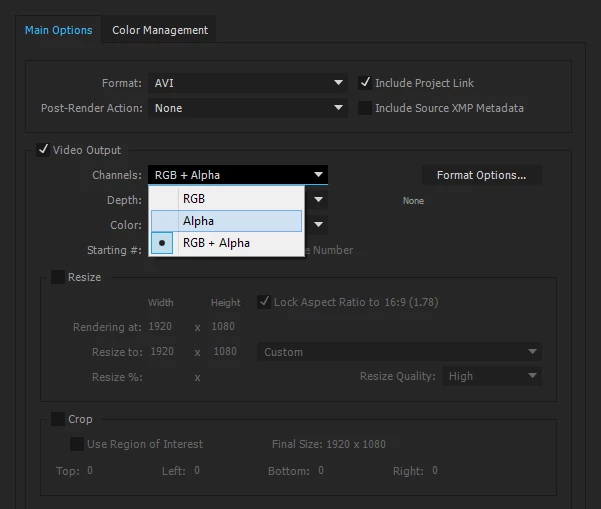
How to do this in Adobe Media Encoder?

This topic has been closed for replies.
Correct answer Kevin-Monahan

Hi Ti.S. Cavalcanti,

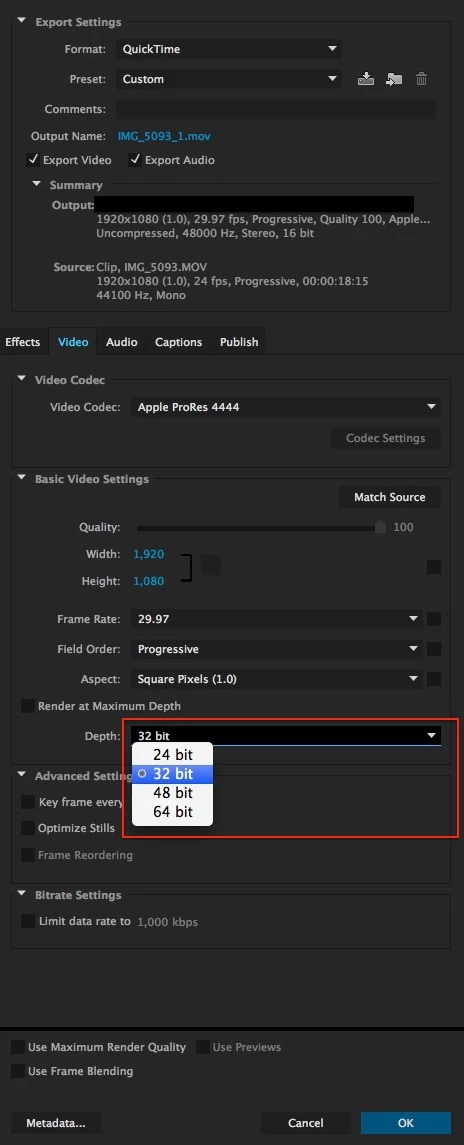
You have to make sure to set the bit depth to 32 bits. Note that only specific codecs allow you to do this.
Thanks,

Kevin

3 replies

Inspiring
October 26, 2020

None of the cedec presets in Media Encoder seem to offer 32 bits as an option. Does Media encoder do transparency?

Known Participant
July 17, 2016

Well, I've found a different solution. In Media Encoder, I changed the format to quicktime, then in video codec, to PNG. Done. My videos with transparency in avi were almost 2gb. Now have only 20mb, and with the same quality

New Participant
October 3, 2017

hey there.

i dont seem to have a png codec. please ellaborate

Participating Frequently
October 3, 2017

Kevin-Monahan
Community Manager
Kevin-MonahanCommunity ManagerCorrect answer
Community Manager
January 22, 2015

Hi Ti.S. Cavalcanti,

You have to make sure to set the bit depth to 32 bits. Note that only specific codecs allow you to do this.

Thanks,

Kevin

Kevin Monahan - Sr. Community & Engagement Strategist – Pro Video and Audio
ti.s.cavalcanti
Inspiring
January 22, 2015

What happens if you put more bits? 48 or 64 for example.

What if I want to render only alpha, how do?

Kevin-Monahan
Community Manager
Community Manager
January 23, 2015

Hi ti.s.cavalcanti,

ti.s.cavalcanti wrote:

What happens if you put more bits? 48 or 64 for example.

What if I want to render only alpha, how do?

Good questions. Let me look into that for you.

Thanks,

Kevin

Kevin Monahan - Sr. Community & Engagement Strategist – Pro Video and Audio