


Beta iStream
Participant
December 11, 2018
Question

Media Encoder (CC2019 Problem) - hangs/freezes during encoding

  • December 11, 2018
  • 26 replies
  • 82930 views

I have a problem with the encoder after upgrading to version 2019. The same problem occurs on two workstations. At random moments, the program stops working for no particular reason. This is a very big problem for me because I can not go back to the 2018 version at this stage of the post-production and I have to encode over 250 films. The only solution that work for me right now is direct export from Premier Pro. But how can you imagine the employment of someone who is sitting and every 30 minutes is encoding another movie is not the best solution.

What I did:
- reinstall all Adobe apps
- clean cash
- update graphic card drivers
- on one of the stations, I even reinstalled the entire windows
- I tried to encode without CUDA
- I did update to 13.0.1
- I did update to 13.0.2

... nothing works. Since I've experienced the problem, Adobe has already sent two updates, but none of them solved my problem. There is only one machine in the entire office that has no problems with 2019 Encoder and it's a laptop (Lenovo IdeaPad with Intel Core i7 6700HQ and GeForce GTX 950M).

Workstation parameters:
Intel Core i7 7700K

B250-HD3P-CF (Motherboard)

16GB RAM (ViperX)
GeForce GTX 1050Ti

Additional information

all postproduction takes place on network drives available in the local network


Printscreens

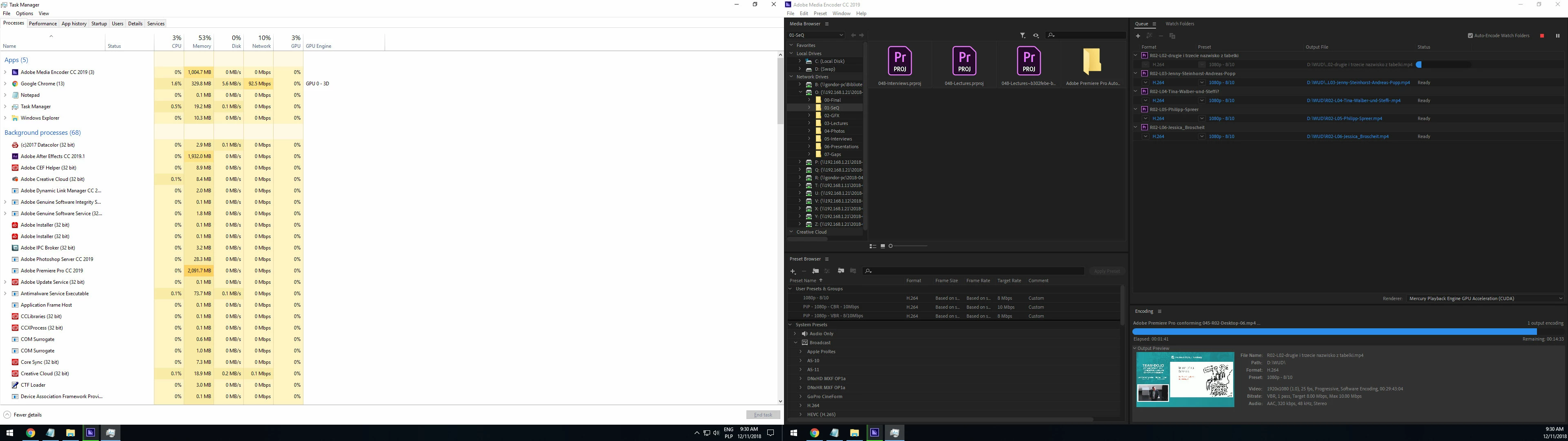
1. sometimes hangs during conforming (printscreen was made after 15 minutes in this state - the application did not report any error or crash)
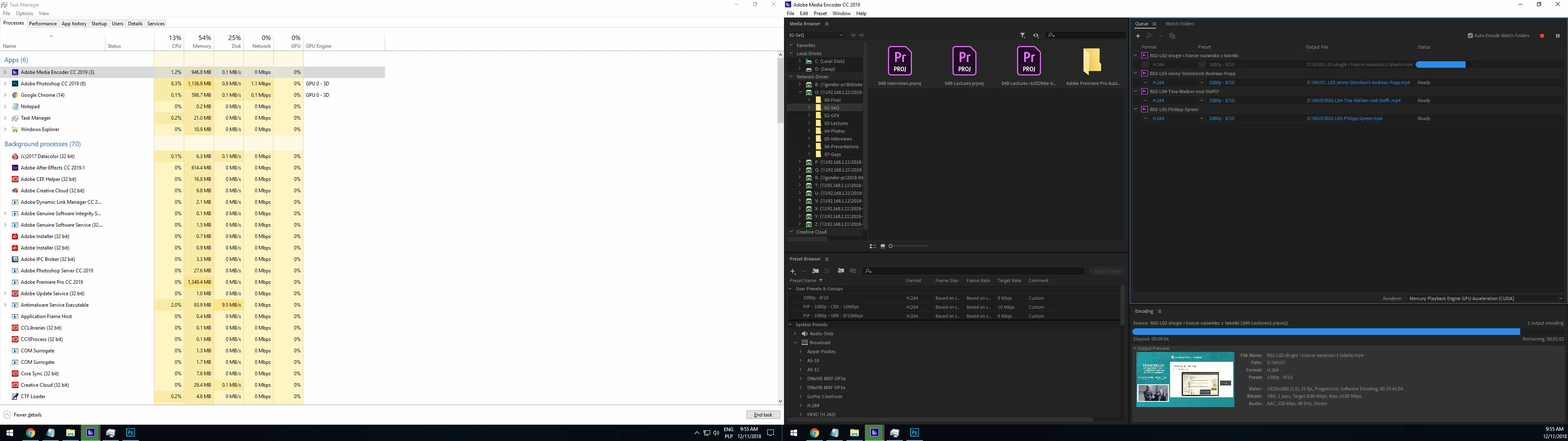
2. but in most cases it looks like this ( the application did not report any error or crash)
Help?

This topic has been closed for replies.

26 replies

Participant
January 19, 2021

I confirm that it is update graphic card drivers. causing AME software to freeze

Inspiring
March 22, 2022

Adobe - please fix this.  It has been a problem for years!  I am on a new Win 11 machine and it is still doing it.  So, congrats - you have a bug that has lasted across my last THREE computers.  Just sits and hangs at the very end (these are 2 hour h.264 files).  Sometimes it gets through it... 70% of the time it does not - even after waiting all night.  Tried various settings... but that is not the point.  The point is you have a BUG to fix - please.

Participating Frequently
March 24, 2020

Hi guys, I solved this problem. Enter the C:\Program Files\Adobe\Adobe After Effects 2019\Support Files\(Media Core plug-ins)\Common\ folder for the solution of the problem. Change ExporterAVI.prm to ExporterAVI.old.

After changing the name, run the program again. Ask to import any .mov or .mp4 file. The problem will be solved. This problem is valid in Media Encoder, Premier Pro. For the Media Encoder C:\Program Files\Adobe\Adobe Media Encoder 2019\Plug-Ins\Common\   Change ExporterAVI.prm to ExporterAVI.old. Programs run smoothly. For the Premier Pro. Enter the C:\Program Files\Adobe\Adobe Premiere Pro 2019\Plug-Ins\Common\   Change ExporterAVI.prm to ExporterAVI.old.   Enjoy.


Participant
April 10, 2020

Found an other SOLUTION.
I have an AE project with imported MOV, MP4, JPG, CR2, WAV, MP3 and some camera Tracking, 3D-Trackers etc. Even the Media Encoder 2020 stopps after the first third of encoding. No chance of getting an H.264 File - not even 5 minute parts of the whole 16 minutes film.


SOLUTION:


1. rendered out Sound as a seperate WAV-file.

2. rendered the whole file as PNG-Sequence*

3. reopened the WAV and PNGs in a new file


4. rendered it again in H.264 with Media-Encoder 2020


DONE!

well... about the time: you render twice - but you got a file in the end 😉

*@Adobe: Did you finally find a solution about rendering out PNG-Sequences by numbers? The internalt AE Render Queue counts by frame number - GREAT! The Encoder starts every frame with number 0 irrespective from wich frame i start to render out - NOT great.

Just Bartee
Participant
January 3, 2021

I did this for PP and AME.   It seems to have worked.   I have also remove all of the marks from 5 differents sequences.  I do not think that did any thing,

C:\Program Files\Adobe\Adobe Media Encoder 2020\Plug-Ins\Common\ExporterAVI.prm.old
C:\Program Files\Adobe\Adobe Premiere Pro 2020\Plug-Ins\Common\ExporterAVI.prm.old 

It seems like Adobe would FIX THIS !!!   

Participating Frequently
March 12, 2020

I recently had a freezing problem when using media encoder with premiere pro when rendering h264. I use 2019 version and it was working fine until recently. Then, I recalled when I was changing the settings in Premiere Pro to improve its performance, I changed the Video Rendering option from OpenGL to Software Only. But, I never changed the Media Encoder with the same rendering option with Software Only. But once I changed it, it's now working great and fast again. So, just make sure that both Premiere Pro, and Media Encoder uses the same rendering option. You might also make After Effects the same too if you use it with Media Encoder to do export rendering. Hope this helps!


iz

randygebhardt
Participant
October 6, 2019

I don't know if anyone found another solution to this issue, but I completely solved my problem by switching from an Nvidia GeForce graphics card to a Radeon graphics card.  I built a very powerful Win machine to handle large file video editing and rendering (i9-9890, 128 GB RAM, originally the GeForce 2080 IT graphics card, 14 TB NVe memory on board).  100% of the time I tried to render or transcode to create proxies, it froze up, at random points working through the Media Encoder queue.  I even downloaded ME 2018 and still froze. In this stream someone hinted it might be a conflict between CUDA on the Nvidia GeForce and ME.  Then I swapped out the GeForce for a less powerful Radeon 5700 XT by Sapphire -- and voila, not one freeze since. This is fortunate, because I built this machine for a large film editing project to be faster than my MacBook Pro or a new iMAc that would have cost $4,500 more than I built my machine for. Comparing, the same file that takes 13:00 minutes to render on the MacBook Pro takes just 1:50 on my new machine - a huge time savings. (That is if I render off files sitting on my internal SATA or flash SSD...working off the internal HDD, it takes 5:00 which is still a 60% improvement over the i7 MacBook Pro.  By the way, I was wondering why my MacBook Pro never freezes when transcoding or rendering in Media Encoder because this stream says some Macs have the freezing problem as well-- and low and behold, my MBP has a 4 GB Radeon graphics card.

Participant
November 23, 2019

I have the same problem with a Radeon Card (RX590 Sapphire). My computer is a new custom build: i7 8700K, 32GB.  I exported to Media Encoder 13.0.2 and half way through it just stops - it doesn't crash, just stops. I was just rendering small proxies for client approval - not even rendering an HD output.  The program is over an hour long though, maybe that has something to do with it, I don't know. I do know that there are about 5 pages of complaints here and virtually no action from Adobe. This makes me sad. I'm trying DaVinci next.

Known Participant
January 30, 2020

An additional data point. I will experience this problem when using variants of dynamiclink. Most current issue, I round robin a sequence to audition to clean dialogue. Tried to queue and no sign of life (no indication of loading the project, but acts like it is encoding, vial the AME "transport buttons". New project, stripped the content from the sequence that was sent to audition, using copy and paste (left out the audition audio, using original) and tthe sequence is working.


Next I will try to copy/paste the audition audio into this timeline and see what happens.

Participant
August 21, 2019

I'm totally stalled on my work because of this problem too.

working on a pc here, nvidia 670gtx (ikr) 32 gb ddr4 ram, i7 processor blah blah

problem with rendering both in pp and media encoder, tried hardware (cuda) as well as software only.

Media cache drive has more than 100gb of space for a 4 minute sequence.

Everything starts off fine, and uses a normal amount of cpu and gpu (for hardware mode)

After a while it goes to shit and 0% GPU used

Same thing happens with media encoder

Same thing with software encode:

Then just stops, no error message nothing.

The same f***ing thing happens in pp 2019 13.1.4, 13.1.0, as well as 12.1.2

4 Nvidia drivers tried (same thing happens), tried another project, same thing.

I don't get it, it worked fine just not too long ago

This sequence is not even that complex, I'll have to stop my subscription and go to resolve because of such a s**t software

Participant
August 2, 2019

OK>> Found this narrative - and so ANGRY at Adobe for their complete LACK of support and investigation. In this ENTIRE thread there is only 2 replies from them. NOTHING MORE!!

ok Rant over..

Stop ALL Adobe program instances running. Even go into the task manager and stop all if needed. ESPECIALLY Asobe_IPCBroker.exe. Find all instances of "AdobeIPCBroker.exe" on your machine. RENAME IT to OLD_AdobeIPCBroker.exe.
Open Premiere OR ME

The following is a snapshot of the error I get when opening.

Leave it OPEN!!! Do not click on any of the options.
I went into premiere Pro and sent 10 rendering jobs to ME. ALL ran fine using CUDA (and quite fast may I add).

before this on the 2nd render job it would FREEZE even when I used export from Premiere and not use ME.

It would appear the issue is their vulcan license confirmation. Of course they wont OWN up to this..
Premier Pro CC2019
Adobe ME 13.0 (downgraded as part of the initial troubleshooting - probably wont upgrade till next year IF THAT)

Does Final Cut have these much problems?

ENJOY! !

Participant
August 21, 2019

same thing happened, thanks for  suggesting this though

Inspiring
June 1, 2019

Here's the update for you...

I had a recurrence of some crashing with AME, and noticed the CCAPP loging out over and over at the same time.  This points to the fact that the dynamic link service runs behind that app interface with their new TEAMWORK platform.  When the CCAPP corrupts its cached running data in some way (it keeps info about all the apps you install for the purpose of making sure they can connect to one another), you will get problems when attempting to link.  It could also be that the software simply checks your CCAPP for your login info (antipiracy anyone?) and crashes out when that info isn't sent back properly.  Either way, I can tell you I still have to go to my Antivirus to trust new stuff for adobe when I update, and I have to cleanse the CCAPP when it updates anything, even if only the LEARN section is changed when I minimize it.  Seems to be a bug with the CCAPP primarily.

I also found that if you have any related apps or interconnected apps on your system, you have to start from the same base version (year).  If you are like me and keep CS6 apps on your system for backward compatibility and DVD outputs, you'll have to start with 2016.  That's the only path that has worked all the way through.  After intel then nvidia drivers, do the update apps path.  Not before.

Participating Frequently
May 10, 2019

I've found my computer has stopped doing this (I'm on a Mac) but my odd solution was making sure I exported to an external hard drive. Not sure if that's helpful for anyone but that seemed to stop my issues.

Participant
November 23, 2020

This is quite an old thread, but I wanted to mention this helped me also - thanks! I had issues where ME(v14.6) exports would just stop - no error, no crash, nothing. This would happen at random intervals, no matter the renderer or settings used.


I'd tried many of the suggestions in this thread, but in the end all it took was exporting to an external drive. Hope this helps someone else.

Inspiring
April 19, 2019

I have been having NO problems with ME until the recent update to 13.2. Now, when I QUEUE a simple project, 1080 H.264, same stuff I've been doing for years, I get an error from ME. Can export direct from PPro, but as of now, ME is useless. Yes, done everything mentioned, reinstall, latest driver updates, cleared all caches, prefs, native import settings, etc., etc., still have the problem. I saw posts backdated years ago about this, and everything I've tried hasn't fixed it. Originally, there was NO error report and ME just silently quit, and the only result from all the fixes suggested has been no I get the error. I will post additional replies if I find something that works.

Inspiring
April 22, 2019

here is the direct link from microsoft on the 6025 error...

Summary


This article discusses an issue that may occur when you are developing a program. If you are still experiencing a problem that resembles the one that this article describes, it may be a different problem. To search for issues related to a specific problem, please include the product name in your search in order to narrow your results. To troubleshoot similar problems, please see the "Similar problems and resolutions" section later in this article.

Symptoms


The C++ program fails and reports the following run-time error:
runtime error R6025
- pure virtual function call

Cause


This error occurs when your application indirectly calls a pure virtual member function in a context where a call to the function is not valid. In most cases, the compiler detects this and reports the error when building the application. But depending on how your code is written, sometimes the problem is detected only at run-time.

The error occurs when you indirectly call a pure virtual function within the context of a call to the constructor or destructor of an abstract base class. This is illustrated in the sample code below, along with some more description.

Resolution


Calling a pure virtual function is a programming error, so you need to find the call to the pure virtual function and rewrite the code so it is not called.

One way to find a call to a pure virtual function is to replace the pure virtual function with an implementation that calls the Windows API function DebugBreak. When using the debugger, DebugBreak will cause a hard-coded breakpoint. When the code stops running at this breakpoint, you can view the callstack to see where the function was called.

Another way to find a call to a pure virtual function is to set a breakpoint on the _purecall function that is found in PureVirt.c. Breaking on this function has the advantage of keeping the stack intact so that you can trace what is occurring.

Status


This behavior is by design.

More Information


For more information, refer to the "C Run-Time Errors R6002 through R6025" page of the "Build Errors" section in the following Microsoft Developer Network (MSDN) Web site:
http://msdn2.microsoft.com/en-us/library/aa277044(VS.60).aspx

Note The R6025 error is not documented in the manuals or online help included with Visual C++, versions 2.x or below. However, it is briefly discussed in Part 3 of the Readme.wri file shipped with Visual C++ version 2.0.

Sample code

   /* Compile options needed: none
   */

   class A;

   void fcn( A* );

   class A
   {
   public:
       virtual void f() = 0;
       A() { fcn( this ); }
   };

   class B : A
   {
       void f() { }
   };

   void fcn( A* p )
   {
       p->f();
   }

   // The declaration below invokes class B's constructor, which
   // first calls class A's constructor, which calls fcn. Then
   // fcn calls A::f, which is a pure virtual function, and
   // this causes the run-time error. B has not been constructed
   // at this point, so the B::f cannot be called. You would not
   // want it to be called because it could depend on something
   // in B that has not been initialized yet.

   B b;

   void main()
   {
   }


In a nutshell, the new version of adobe is incomplete!!!  they built a function call without building the function!
Inspiring
April 22, 2019

Eyack! Well, here's hoping someone catches this and fixes it. Direct export is definitely less than optimum for me.

christianr19454946
Participant
April 13, 2019

Having similiar Issues here.
Encoded with Media Encoder and a 15 min video was taking more than 7 hours to encode.

Tried with direct export from Premiere and only took 17 minutes.

What is going on???