
Participant
December 26, 2019
Answered

Media Encoder Pauses itself when Premiere Pro is playing [macOS]

  • December 26, 2019
  • 3 replies
  • 16103 views

I'm running into an issue that I have never run into before. I queued up a sequence to be rendered from Premiere to Media Encoder. I started the render in Media Encoder, I went back to Premiere to start on a new project in Premiere while Media Encoder renders in the background. The issue is that every time I hit play on the Premiere Timeline, it pauses the Media Encoder render. I've checked everywhere and can't find the issue within the software. I may be overlooking something. I also can't find anyone having the same issues online. This is a new problem. It hasn't acted like this before. I have attached a video below that demonstrated what I'm talking about. I'm on a 2017 iMac Pro with a 3.2 ghz Intel Xeon W. 32gb RAM. Raedon Pro Vega 56 8gb RAM.


Title edited by Mod
This topic has been closed for replies.
Correct answer David Arbor

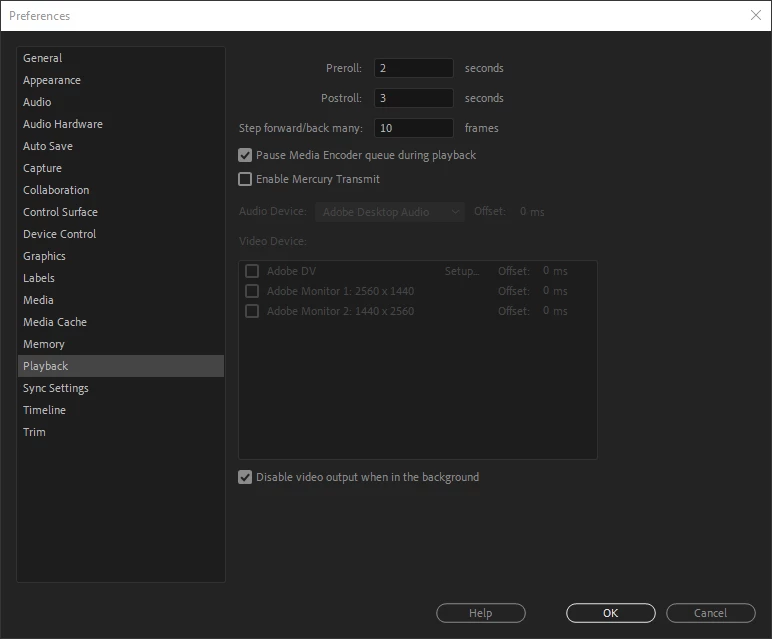
AME has worked like this for quite some time, and it is intentional, but can be disabled in the Premiere Pro prefs.

Perhaps you or someone else disabled this option in the prefs before, but it is on by default.

Go to Premiere Pro > Preferences > Playback 

and uncheck the "Pause Media Encoder queue during playback" option. 


3 replies

TheRomeroEffect
Participant
May 12, 2021

YES! This absolutely worked! Thank you for your contribution @David Arbor - 5 stars!!!

Inspiring
May 12, 2021

Great, glad it helped!

TheRomeroEffect
Participant
May 12, 2021

Keep up the great work 🤙

Shivangi_Gupta
Community Manager
Community Manager
January 4, 2020

Hi there,


We're sorry for the delay in response. Did you try the suggestion provided by @davidarbor? Did it help?

Looking forward for an update.


Thanks,

Shivangi

David ArborCorrect answer
Inspiring
December 27, 2019

AME has worked like this for quite some time, and it is intentional, but can be disabled in the Premiere Pro prefs.

Perhaps you or someone else disabled this option in the prefs before, but it is on by default.

Go to Premiere Pro > Preferences > Playback 

and uncheck the "Pause Media Encoder queue during playback" option. 


markc5470970
Participant
November 11, 2022

i just logged in to say THANK YOU for this!! i don't think it was ever changed manually for me, but i wonder if things get reset/changed when Adobe Creative Cloud installs updates/new versions of the software. this was driving me nuts!