
Moved Media Encoder to D: Drive, with all CC apps
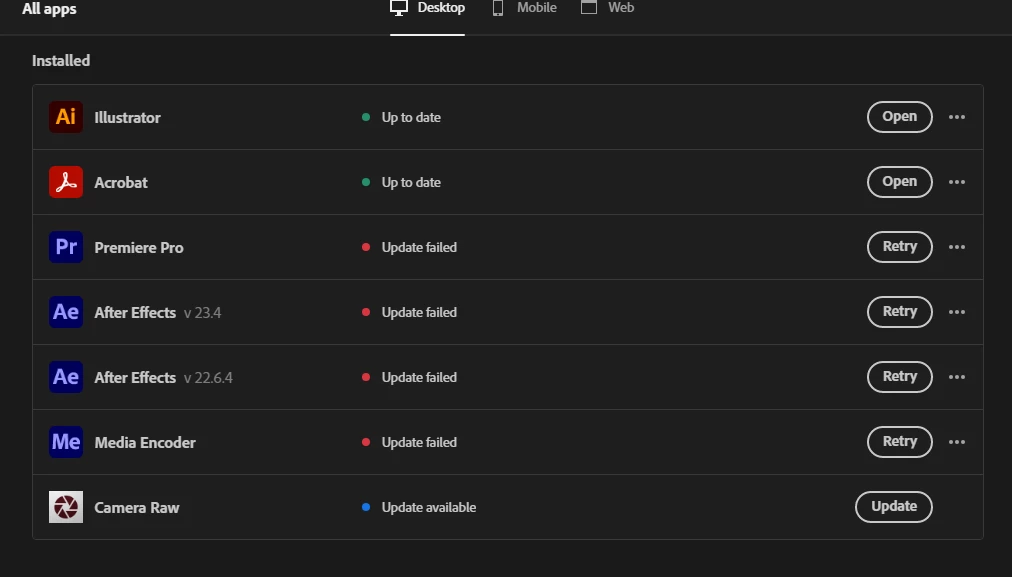
So my SSD was getting clogged up so I decided to move all my files to my 😧 drive. All my apps are on there including Premiere Pro and Photoshop - I can open them fine through the files themselves but it seems Creative Cloud doesn't know where they are. Premiere Pro didn't recognise Media Encoder so I forcefully uninstalled it and tried to reinstall it to no luck. Creative cloud keeps trying to update it on my C: drive, obviously it isn't there any more.
In preferences I've changed preffered install location to my 😧 drive but still nothing - and I can't change the syncing location as I recieve and error message when I try to do so. Can anybody help? I've got a load of work to do and basically can't create any proxies right now. I'll attach some images.
The biggest issue is I can't reinstall Media Encoder or AE because Creative Cloud doesn't know they're not installed.
 AdChoices