
bsancken
Participant
November 14, 2019
Question

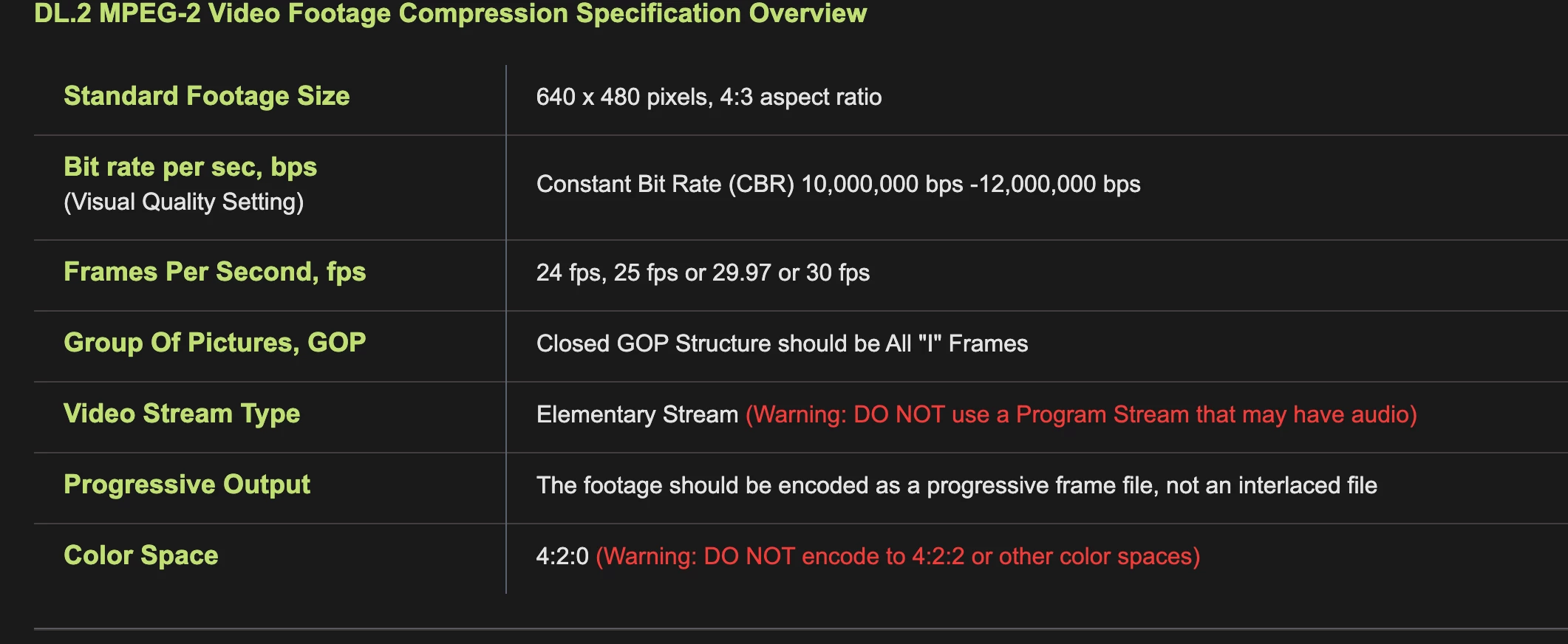
MPEG2 format with Closed GOP/ specific requirements.
  • November 14, 2019
  • 2 replies
  • 1998 views

So this is the specs that I need a preset file for but I am having an issue finding the settings for this. Specifically the GOP settings and the video stream type. I am not sure if Media Encoder is capable of this level of control or not..


The source files are mp4 and need to be converted to mpeg2, any help/suggestion is welcome. 

Thanks!!

This topic has been closed for replies.

2 replies

Stan Jones
Community Expert
Community Expert
August 14, 2020

Marcos,


Really no idea. Let's see if someone else can add any real knowledge.


Stan


Participant
August 26, 2020

Hi Stan


Ok, thanks for info. Would you mind letting someone that have worked a lot with M2Vs, getting info about this post?
Would really want to move forward on this issue.


BR
Marcos

Stan Jones
Community Expert
Community Expert
November 14, 2019

In Export Settings, pick format MPEG2 and then scroll down in the Video tab until you see GOP Settings and Advanced Settings.

I think to get an elementary (video) stream, just deselect the "Export Audio" box at the top, right after Output Name. This will give you an m2v file.


Participant
August 12, 2020

Hi 
I have a similar scenario, where the specs sometimes work and sometimes, in shorter material(eg. 4 sec)  does not.

steps to take:

So, questions:
(transcoding to M2V)

1. Are Adobes MPEG-2 specs, the same as always? Has anything changed, ie. that could mess up these settings.

2. Will transcoding from certain codecs, XDCAM, PRORES, etc differ in the ouput when doing an M2V?
3. Some users get different bitrates(too low/high) when doing 4 sec material, why? Often when converting photos to video clips.


Thanks for all feedback input.

Marcos