Participant
February 11, 2020
Question

Severe memory leaks preventing projects from completing

  • February 11, 2020
  • 4 replies
  • 1722 views

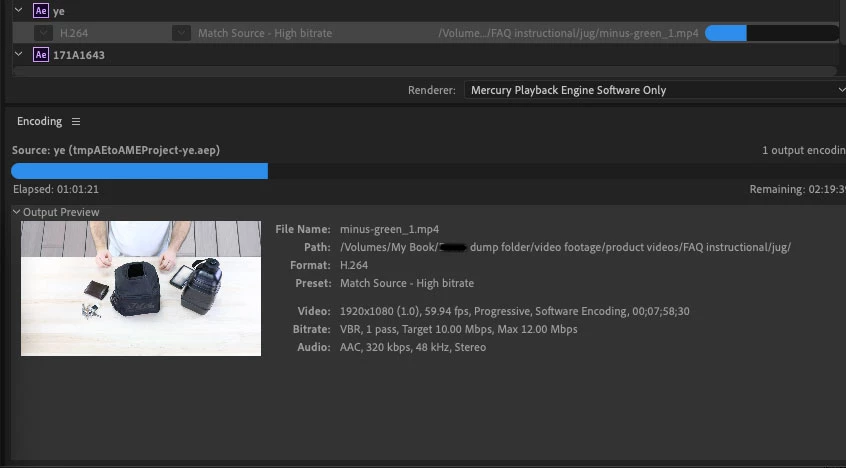
Hello, Im fairly at my wits end with this issue. Im uncertain as to whether it's a media encoder, after effects, or computer-related issue. I've been trying to render a green screen removal from a roughly 8 minute video in 1080p at 60fps. Over my last few tries, it's ended in my computer seemingly "leaking" memory and locking up the rendering process. In the image below you can see that the activity monitor is reporting the core rendering to be using more memory than what's even available on my computer. This rises to about 120gb-ish until the core resets and starts climbing from 0 again. Hence the pressure trend. Closing all adobe applications does not end this constant up and down leaking from stopping. 
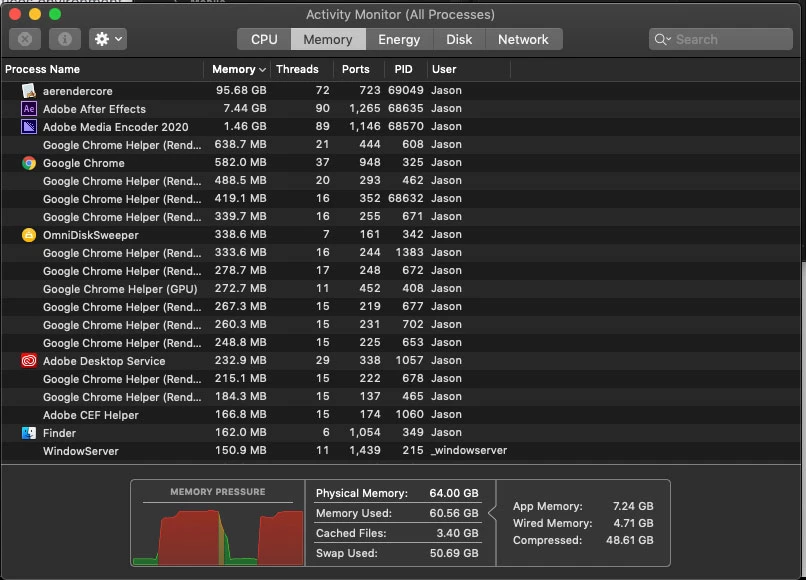


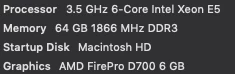
I have the RAM usage for adobe applications capped out at 50gb just to leave room for various other computer functions. The cap seems to be ignored anyway by these applications. Below are my computer specs in case anyone might be suspect it's not on par with this particular render request. 
 

I understand the simple answer is to shorten the length of my videos, which can be done, but it seems application breaking to me that it will get as far as this point. 

This topic has been closed for replies.

4 replies

Legend
February 15, 2020

Background info.

There are two types of "memory" which are reported, and tools aren't very good at saying which type.

1. Real memory. This is RAM in your computer. You have 64GB of that and cannot use more. This is what is reported in the box at the bottom.

2. Virtual memory. An app can keep asking for memory and the system can keep giving it. The least-recently-used RAM is written out to disk, so the actual RAM is used for the recently-used stuff. This works very well for apps that aren't doing anything, but when an app tries to make use of all its memory performance drops like a stone. There may be a limit on virtual memory, and apps will be killed if they go over it. To find out the limit, if any, type  ulimit -v  in a terminal window.

Inspiring
February 15, 2020

Not sure if this could have any affect in your situation but I see Chrome in your Activity Monitor. Chrome on Mac has been known to have memory leak issues since about 2018. Not sure if the latest versions have addressed this issue.

Jeff Bugbee
Community Expert
Community Expert
February 13, 2020

Do you have any third party plugins/extensions installed and/or being used in this project? The RAM usage limiter applies ONLY to Adobe effects. Third party plugins completely ignore that parameter.

Participant
February 13, 2020

I don't believe so. If Im not mistaken theyre all default effects within after effects. 

keylight (1.2)
Key cleaner
Advanced spill suppressor
Lumetri Color
Gaussian Blur

Jeff Bugbee
Community Expert
Community Expert
February 13, 2020

Do you get the same experience if you export directly from AE?

PECourtejoie
Community Expert
Community Expert
February 12, 2020

Hi! the activity monitor image did not make it to the forums...

Participant
February 12, 2020

Odd, theyre showing up for me. Guess thats a different issue haha.

Anyway, heres a link to a google drive folder with all the images, in case none have shown up. 
https://drive.google.com/drive/folders/1EDdnYMP5ek2x4GqOXJZq1OVga436BelK?usp=sharing

PECourtejoie
Community Expert
Community Expert
February 12, 2020

I see it now. Wil defer to more experienced posters on this very matter.