mkenny10
Participant
January 6, 2017
Answered

Size difference of Quicktime Animation w/ Alpha videos

  • January 6, 2017
  • 1 reply
  • 1945 views

I'm hoping someone can help me with this as I seem to have hit a wall. I need to export a Quicktime video from After Effects (with alpha channel). It is basic text animation with alpha that is then sent to another editor to be overlaid on to other footage. I previously worked on this job in 2015 and the file size of the clip that was rendered and delivered then was around the 80mb mark, which was fine quality-wise.

I revisited this job today to make a change and although I'm sure I've used the same export settings as before, the same file seems to have blown up to 500+mb. I compared the two in Mediainfo and this difference seems to be coming from the much higher variable bit rate in the newer file. However, I seem to be struggling to find anywhere to actually set this bit rate in AE or AME, all options seem to be greyed out. Aside from that, all the other details seem to be the same so I'm wondering what I've missed. Is it possible to even set this bitrate anywhere while keeping a Quicktime + Alpha format?

I'm currently using After Effects CC 2017 and Adobe Media Encoder CC 2017. Screenshot of the comparison of the two clips is attached.

Thanks!

This topic has been closed for replies.
Correct answer Joost van der Hoeven

Version 10 has a bitrate of 50,9 Mbps, while version 9 is at 6,985 Kbps (about 7 times smaller).

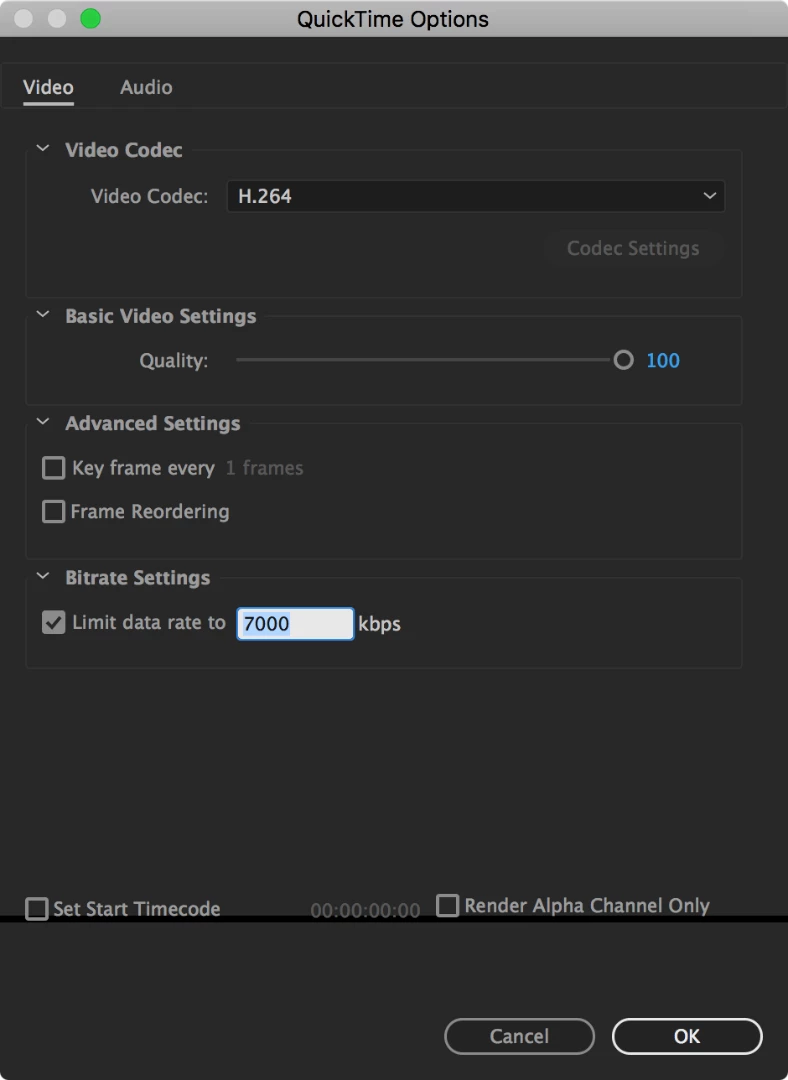
In Ae's Render Queue, change the Bitrate Settings to 7000 kbps to match the setting of version 9.

1 reply

Joost van der Hoeven
Community Expert
Joost van der HoevenCommunity ExpertCorrect answer
Community Expert
January 6, 2017

Version 10 has a bitrate of 50,9 Mbps, while version 9 is at 6,985 Kbps (about 7 times smaller).

In Ae's Render Queue, change the Bitrate Settings to 7000 kbps to match the setting of version 9.

mkenny10
mkenny10Author
Participant
January 9, 2017

Thanks for your reply Joost,

I'd like to avoid using H264, as this is still an intermediate file and as far as I know it doesn't support alpha channels (at least not without a workaround, but correct me if I'm wrong). Those settings appear greyed out when the Animation codec is selected - I don't know if this is a limitation on my machine or if it's not possible from the AE render queue.

I find it strange that I've outputted a video with a bit rate limit in the past (that appears to be identical to my previous exports in all other ways) but can't seem to set one now.

Joost van der Hoeven
Community Expert
Community Expert
January 10, 2017

Ehh, but version 9 is using MPEG4 encoding (h.264 is a subset of MPEG4).