
SSP
Known Participant
December 20, 2020
Question

Cannot convert MP3s to AAC - (Context: Audio files from an online course)

  • December 20, 2020
  • 1 reply
  • 1250 views

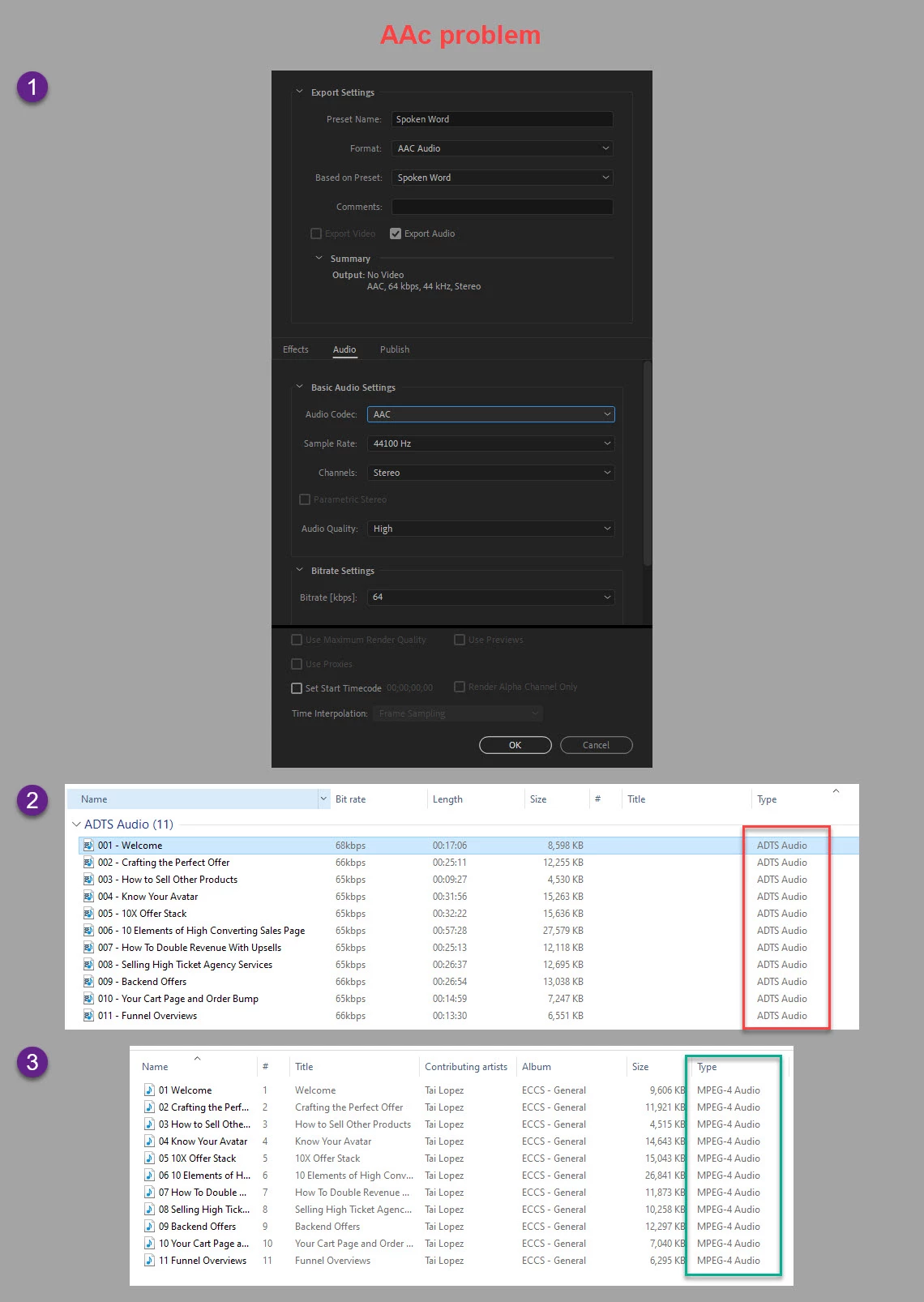
I tried to convert/export a bunch of MP3 files from an online course I purchased to AAC so that I could listen to the modules on my iPhone. However, as you can see from the attached screenshot, after conversion in AME the files show in Windows Exlorer as "ADTS Audio". They don't play or get recognised in iTunes even though the file extention is AAC.


I then converted the MP3s using iTunes instead, and as you can see from the screenshot, they now show correctly as "MPEG-4 Audio".


Can you please help me to understand what I am doing wrong in AME to get the same conversion? I have attached a screenshot of my Adobe Media Encoder Settings. Thanks.
 

This topic has been closed for replies.

1 reply

Community Expert
December 20, 2020

Do you have iTunes for Windows installed?  You should be able to play the original mp3 files there as well as sync and play them from your iPhone.


You could also try a two-step approach:  Convert the mp3 file to uncompressed WAV files using Adobe Media Encoder.  Then, import the resulting WAV files into your iTunes library with the iTunes import preferences set to the audio file format that you want to use.

SSP
SSPAuthor
Known Participant
December 21, 2020

Yes I do have iTunes installed and managed to do exactly what I wanted, which was to convert MP3s to smaller files in the AAC format so they don't take up as much space on my cloud storage or my iPhone. 


The point is that converting MP3s in iTunes is very convoluted compared to using AME. What I don't understand is why AME doesn't produce AAC files in a way that iTunes does. How do I get AME to encode files as "MPEG-4 Audio" instead of what it does at the moment which is "ADTS Audio". 

Averdahl
Community Expert
Community Expert
December 21, 2020

How do I get AME to encode files as "MPEG-4 Audio" instead of what it does at the moment which is "ADTS Audio". 


I can sort of do it if i set the format to H.264 and un-check the video and only export the audio. The audio will come in a .mp4 wrapping instead of a .aac wrapping. H.264 is MPEG4. Maybe worth trying? 🙂