
Participant
January 23, 2020
Question

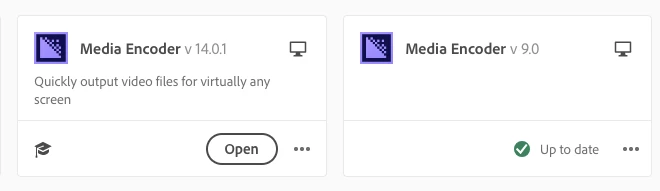
v9 can't be removed from CC hub

  • January 23, 2020
  • 1 reply
  • 221 views

v 9 doesn't seem to actually be on my computer, but it shows up in the hub.  The dot selector on v9 doesn't allow you to uninstall.  It seems like there may be an xml doc somewhere or something that has kept a link to it, but I just went through an adobe support person and we attempted to remove it and couldn't find anything to remove.  


Any thoughts?
This topic has been closed for replies.

1 reply

Shivangi_Gupta
Community Manager
Community Manager
January 24, 2020

Hi there,


Ideally, the Creative Cloud desktop application shows the installed version of the application. This issue looks strange to me. I would recommend you to perform clean installation of the Adobe applications and then test the outcome.

Here's how: https://helpx.adobe.com/creative-cloud/kb/cc-cleaner-tool-installation-problems.html

Let us know how it goes.

Thanks,

Shivangi