Participant
June 16, 2020
Answered

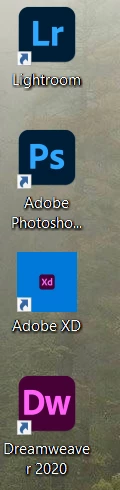
Adobe app logo is supper small

  • June 16, 2020
  • 2 replies
  • 770 views

Love the new design improvements to the app logos, but the update made my destop xd logo supper small, any fixes. 


    This topic has been closed for replies.
    Correct answer HARSHIKA_VERMA

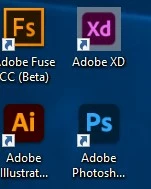
    That is by default  Here is mine


    Yes that is by default for now. I have already a logged a bug for the issue and the team is working on it. You may definitely see improvements in the future releases of XD.


    Thanks,

    Harshika

    2 replies

    HARSHIKA_VERMA
    Community Manager
    Community Manager
    June 16, 2020

    Hi there,


    We are sorry to hear that your XD logo is appearing very small. We would request you to please try uninstalling and reinstalling Adobe XD.


    Let us know if that helps.


    Thanks,

    Harshika

    Participant
    June 16, 2020

    Hi, 
    yes that was the first thing i tried, at which point the second post i showed with the file icon appeared. 

    HARSHIKA_VERMA
    Community Manager
    Community Manager
    June 17, 2020

    Thanks for the confirmation. Would you mind sharing your system information and XD version with us so that we can escalate the issue to the team? I would like to know how you've created these shortcuts on your desktop. Have you installed these apps from Creative Cloud desktop app?


    We will try our best to help.


    Thanks,

    Harshika

    Participant
    June 16, 2020

    its worse now, i sitll can open and use it normally