
Participant
October 16, 2017
Answered

Adobe Xd Bug!

  • October 16, 2017
  • 2 replies
  • 1320 views

Wishing everyone around a good day.

Yep, so I am kinda having a problem with my Adobe Xd. The thing is once I install the software, I am welcomed and I can open my canvas but if i try doing any design on the canvas it remains blank. For example, I wanna draw a square, I try doing it and Boom, there's an invisible square with all its dimensions hence I cant work on it.

I reinstalled the app thrice.

My GPU is updated.

I have got the latest DirectX on so i dont see that as a problem.

Why this? Anyone help?
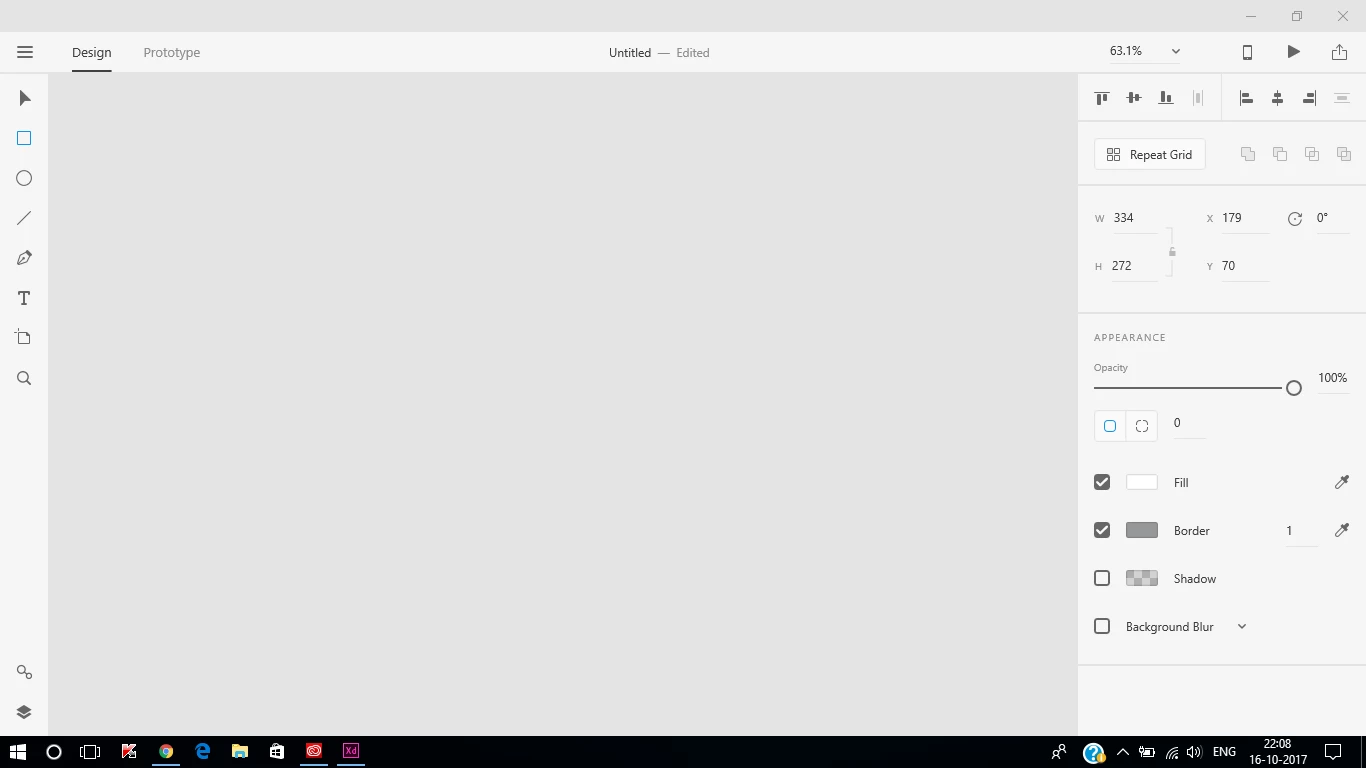
Hardware specs:

RAM:8GB

Graphics Card: Nvidia Geforce 940MX + Intel HD 620 (2GB)

Processor: Intel i5 7200U

Thank You for the help!

    This topic has been closed for replies.
    Correct answer Colin Holgate

    You are not just missing the rectangle, you also have no artboards showing. Try typing Ctrl-0 (that's zero, not the letter O). That will zoom the area to include all artboards.

    If nothing shows up then you should look at this uservoice report, and add a comment:

    Artboard Not Showing in Windows 10 – Adobe XD Feedback : Feature Requests & Bugs

    2 replies

    Colin Holgate
    Colin HolgateCorrect answer
    Inspiring
    October 23, 2017

    You are not just missing the rectangle, you also have no artboards showing. Try typing Ctrl-0 (that's zero, not the letter O). That will zoom the area to include all artboards.

    If nothing shows up then you should look at this uservoice report, and add a comment:

    Artboard Not Showing in Windows 10 – Adobe XD Feedback : Feature Requests & Bugs

    Preran
    Community Manager
    Community Manager
    October 23, 2017

    Just to be sure, can you verify that your system meets these requirements?

    Adobe XD System requirements