Exit
  • Global community
    • Language:
      • Deutsch
      • English
      • Español
      • Français
      • Português
  • 日本語コミュニティ
  • 한국 커뮤니티
0

Adobe XD is using a wrong Chinese font and display wrong characters

Guest
Oct 26, 2021 Oct 26, 2021

Hello.

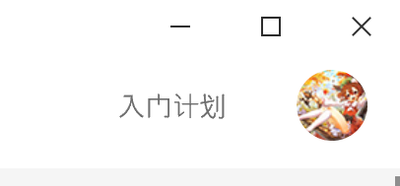
It seems that my AdobeXD is not configured correctly, in its user interface it is display Chinese letters with wrong fonts.
5C73_1-1635303327132.png


This word should be 入门计划 but actually its displaying like this hence I could not recognize the character. It seems that it is using the default "Segoe UI" font, which would not display Chinese characters correctly.
5C73_0-1635303265104.png

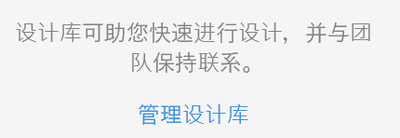
In this picture the character 与 is not displaying correctly, either.

But Other Adobe products are displaying Chinese characters correctly, not using this wrong font.

I did not found where to configure the font Adobe XD is using anywhere so I wonder if this is a bug.

TOPICS
Product performance
452
Translate
Report
Community guidelines
Be kind and respectful, give credit to the original source of content, and search for duplicates before posting. Learn more
community guidelines
Adobe Employee ,
Oct 29, 2021 Oct 29, 2021
LATEST

Hi there,


Sorry to hear about the trouble. Could you please share the version of XD and Windows OS along with a screenshot capturing entire XD screen. We're here to help, just need more details.


Regards

Rishabh

Translate
Report
Community guidelines
Be kind and respectful, give credit to the original source of content, and search for duplicates before posting. Learn more
community guidelines

