
Participant
October 27, 2021
Question

Adobe XD, potential MacOS Monterey Bug (Interface/Menu Options Disabled)

  • October 27, 2021
  • 2 replies
  • 2733 views

Having critical issues since updating to MacOS Monterey.


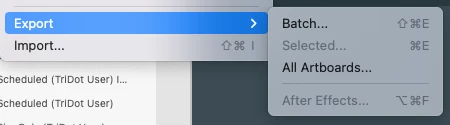
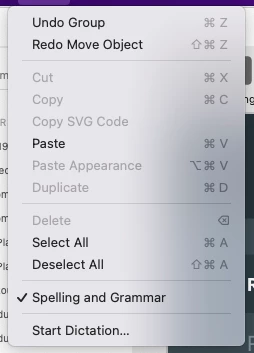
I can no longer export documents or take any interface actions. I can move elements on my pages, but menu actions, such as simple copy and paste, no longer work and are seemingly disabled.


This only began happening after an update to MacOS Monterey, and I can't find any other users with similar issues and potential resolutions.


This has brought my workday to a grinding halt, and outside of rebuilding the entire interface in Figma, I see no other option than to hope rolling back to the previous version of MacOS via a system restore is going to fix the issue (I've already started that process). 


I am moving my workflow to Figma, and coincidentally started that process this week, but I'm probably a good week away from transposing my design system and rebuilding my component libraries. 


Has anyone else run into a similar issue? 


Export disabled:


Copy and paste disabled, along with other actions:
 

    This topic has been closed for replies.

    2 replies

    Participant
    November 2, 2021

    I have the same problem. For me the task is possible to do but it is impossible for me to get any dialog box for this option. 

    Atul_Saini
    Legend
    November 2, 2021

    Hi Magnus, thank you for sharing the details. Can you confirm if you're able to use the shortcuts after removing the extended monitor from C- type/TB3 port? 


    If yes, please share the logs from your machine using this link:- https://helpx.adobe.com/creative-cloud/kb/cc-log-collector.html. Please upload the logs to CC or Dropbox and share them via private message. 


    Thanks,

    Atul_Saini


    Participant
    November 3, 2021
    quote

    Hi Magnus, thank you for sharing the details. Can you confirm if you're able to use the shortcuts after removing the extended monitor from C- type/TB3 port? 


    If yes, please share the logs from your machine using this link:- https://helpx.adobe.com/creative-cloud/kb/cc-log-collector.html. Please upload the logs to CC or Dropbox and share them via private message. 


    Thanks,

    Atul_Saini


    By @Atul_Saini


    Yes I can confirm it now works without the extended screen. 

    Harshika Verma
    Community Manager
    Community Manager
    October 27, 2021

    Hi Silverjerk,


    We are sorry for the frustration and thanks reporting the issue. We are unable to reproduce the issue at our end. We would like to know the version of XD you're using. Does that happen with all the files or you noticed this on a specific file? 

    If it's reproducible at your end, could you please record a video of your workflow and share with us so that we can investigate better by following your steps?


    We will try our best to investigate the issue.


    Thanks,

    Harshika


    Participant
    October 28, 2021

    Thanks, Harshika. 


    The issue is definitely consistent; and even with fresh installs it continues to happen. Attached a video for review at this link.

    Atul_Saini
    Legend
    October 29, 2021

    Hi there,  I have sent a private message to you with my email and some troubleshooting steps, like, remove external display/ devices from the C - type port and check if the shortcuts are working for you. 


    Here's another interesting thing, in macOS Monterey, all shortcuts appears disabled for all the menu items, it is not just with XD. They get highlighted when you hover over them. However, your situation is a little different than this, apart form being greyed out (as expected) they are not functioning.


    I appreciate your co-operation and patience with this and we'll try our best to get it fixed for you asap. 

    Awaiting your response.


    ~Atul_Saini


    Thank you, @Silverjerk, for sharing the file. I have saved it as a copy, and you can revoke my access to the file. I tried to use shortcuts on the file, and it is working fine at my end.


    Would you mind confirming that your shortcuts are working if you remove the external display from the USB-C/TB3 port? 
    If yes, please share the logs from your machine using this link:- https://helpx.adobe.com/creative-cloud/kb/cc-log-collector.html. In addition, you may upload the logs to CC or Dropbox and share them via private message. 


    I am assuming we are close to identifying the root cause here. These insights would be helpful for our product team to take it further. 


    Thanks, 

    Atul_Saini