
Participating Frequently
July 22, 2019
Question

Adobe XD Slowness issue on macOS(10.14.5) & XD version(21.0.12.11).

  • July 22, 2019
  • 3 replies
  • 1636 views

I am currently working on a design system for a client, using the components library.

I have a lot of dynamic elements(140) , artboards (30) in this document, no image at all, only vector elements and text. The file size is 700ko.

After working 5-10 minutes everything becomes very slow. Sometimes I have to wait 2-3 sec to zoom or pan through the artboards.

The only thing I can do is to reboot my Macbook, but the issue comes back anyway.

I have tried "Onyx" software and "Ccleaner" to improve the performances. But nothing helped.

Thank you for your quick feedback on this topic, my schedule is actually tight and this issue is killing my productivity.

Adobe XD : V21.0.12.11
System :
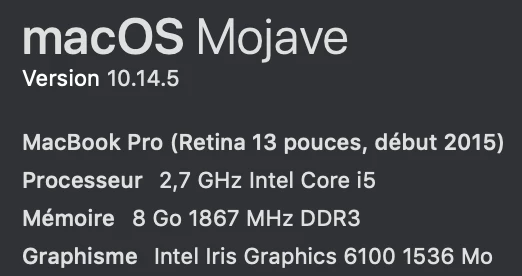
The Tittle was edited by Moderator.

This topic has been closed for replies.

3 replies

cuiz92212262
Participant
July 25, 2019

I have exactly the same problem. XD becomes extremely slow.

Preran
Legend
July 26, 2019

I am not very conversant with Mac versions, but if you are on a Beta version of Mac OS, the team knows of issues with it. We recommend using an official version of OS when working with XD. However, if you are on an official version, send Harshika the details she requested for. We will do our best to help.

Thanks,

Preran

Preran
Legend
July 23, 2019

Also, can you try updating to the latest version that was released yesterday (21.1.12) and let us know if you are still facing this issue?

Thanks,

Preran

Participating Frequently
July 23, 2019

Hello Preran,

As already explained, I have installed this update today, nothing has changed.

Tks.

Preran
Legend
July 23, 2019

Thank you, that helps. Do share the information that Harshika requested for with her. We will do our best to help.

Thanks,

Preran

italosan
Community Expert
Community Expert
July 22, 2019

Hi, thanks for sharing the specifications of your computer with us. However, it could be a graphics card problem. Have you checked if there are any updates?

Participating Frequently
July 22, 2019

Hello,

Thank you for your answer. But, the graphics are managed by the OS directly right? So, if my OS is up to date (which is the case) the drivers should be ok ?

Maybe am I missing something ?

HARSHIKA_VERMA
Community Manager
Community Manager
July 22, 2019

Hi Bertrand,

Sorry to hear you're having trouble using Adobe XD and thank you for sharing the details. Could you please share the file with me over a private message so that I can test it at my end? Please send the URL of this forum post for reference. To send a private message, click my profile picture and use the Message button.

Please let me know if you face any issues with this.

Thanks,

Harshika