Participant
January 24, 2019
Answered

Align Keyboard Shortcuts Mac - Not Working?

  • January 24, 2019
  • 1 reply
  • 1483 views

Do these Mac keyboard shortcuts to Align objects on the art board work for you?

Keys for Align

MenuKeyboard shortcut on macOSKeyboard shortcut on Windows
Left⌃⌘←Ctrl + Shift + ←
Center (horizontally)⌃⌘CShift + C
Right⌃⌘→Ctrl + Shift + →
Top⌃⌘↑Ctrl +Shift + ↑
Middle (vertically)⌃⌘MShift + M
Bottom⌃⌘↓Ctrl + Shift + ↓

They do not seem to be working for me on:

  • macOS Mojave version 10.14.2
  • Adobe XD 14.0.42.14
This topic has been closed for replies.
Correct answer cjwdg

The shortcuts above were copied from:

List of all keyboard shortcuts that you can use in Adobe XD.

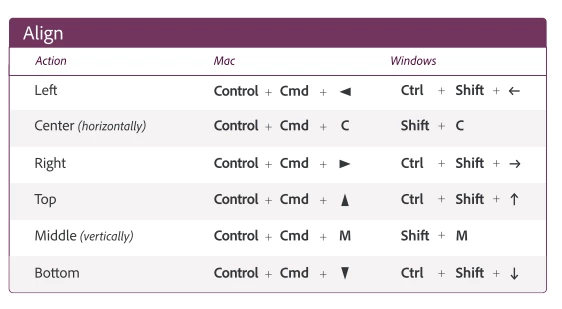
Turns out, I was mistaking "^" for SHIFT (when it's actually CTRL).  The downloadable version of the keyboard shortcuts page (the PDF here: https://helpx.adobe.com/content/dam/help/attachments/XD-Keyboard%20Shortcuts.pdf ) is a little more clear on what those keys are:

1 reply

cjwdgAuthorCorrect answer
Participant
January 24, 2019

The shortcuts above were copied from:

List of all keyboard shortcuts that you can use in Adobe XD.

Turns out, I was mistaking "^" for SHIFT (when it's actually CTRL).  The downloadable version of the keyboard shortcuts page (the PDF here: https://helpx.adobe.com/content/dam/help/attachments/XD-Keyboard%20Shortcuts.pdf ) is a little more clear on what those keys are: