


- Home
- Adobe XD
- Discussions
- Re: Width property does not work well with the key...
- Re: Width property does not work well with the key...

Copy link to clipboard
Copied
Lots of times i find myself using the width input, using the keyboard arrows, to fine-tune the, well, width of the object. I click on the input, then i use the keyboard arrows, 1, 2, 3 times or more until i reach the desired width.
After updating to 24.0.22.19, this changed only for the width input (the height input is working properly), apparently. I click on the input, hit the arrow 1 time, and immediately the input deselects and the 2nd keystroke won't change the input (as a collateral, it just makes my object move instead).
Hope it's an easy fix... Good work!


 1 Correct answer


Hi there,
Here is what I'd request you to try, press Cmd + up/down arrow key for heigh and Cmd + right/left arrow key for width on Mac and Alt + up/down arrow key for heigh and Alt+ right/left arrow key for width arrow key on Windows and share the results.
Thanks,
Atul_Saini

 13
Replies
13
13
Replies
13

Copy link to clipboard
Copied
Hi Uxsquad,
Sorry that you're unable to adjust width of the object using arrow keys. Would you mind confirming if lock aspect is unlocked when you are trying to adjust the width.
I would request you to create a video or GIF to explain this situation better along with OS version which you are using. I tried to change width using arrow key and it is working fine here at my end.
Thanks,
Atul_Saini

Copy link to clipboard
Copied
I have the same issue since the update. I tapped the arrow key once and it deselects the width input.
Gif:
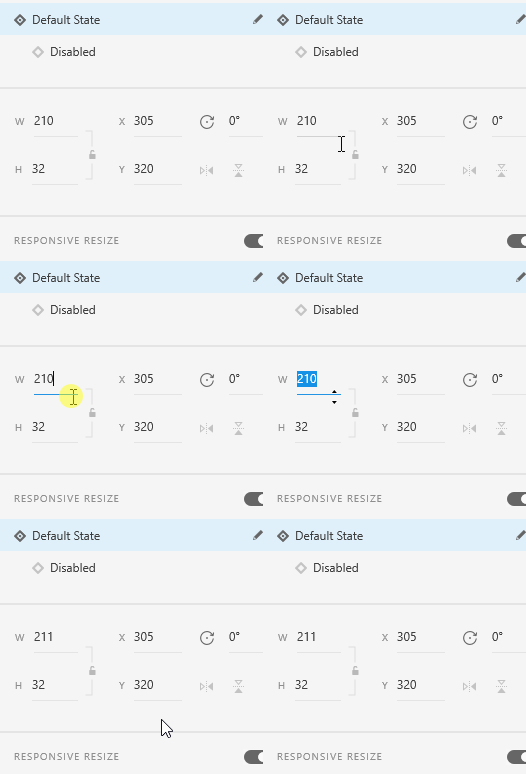
Copy link to clipboard
Copied
Yep, it's exactly like this. It gets out of focus when i hit the arrow keys. I can type a number easily, though, even if composed of multiple keytrokes.
Copy link to clipboard
Copied
Thanks for sharing the GIF alexf01, it was helpful. Could you please confirm if it happening with components boundry box or with all the individual objects as well?
Thanks,
Atul_Saini
Copy link to clipboard
Copied
It just seems to be components.
Copy link to clipboard
Copied
Components too, on this side

Copy link to clipboard
Copied
Hi Alex and Uxsquad,
We are sorry to hear that you are facing trouble with XD. In order to proceed further, we will need to investigate the log files from your machine. Please generate log files using the information provided in this document <https://helpx.adobe.com/in/creative-cloud/kb/cc-log-collector.html> After the files have been generated, upload the files to a shared location such as Creative Cloud, and share the URL with me over a private message.
Please send the URL of this forum post for reference.
Let us know if you face any issues with this. We will let you know if we need any further information.
Thanks,
Harshika
Copy link to clipboard
Copied
Thanks Harshika, log files sent.
Copy link to clipboard
Copied
Hi there,
Here is what I'd request you to try, press Cmd + up/down arrow key for heigh and Cmd + right/left arrow key for width on Mac and Alt + up/down arrow key for heigh and Alt+ right/left arrow key for width arrow key on Windows and share the results.
Thanks,
Atul_Saini
Copy link to clipboard
Copied
Alt-left/right up/down works for me! Amazing. Thank you!

Copy link to clipboard
Copied
Having the same issues - cmd + up/down arrow key doesn't work for me on a mac.
As soon as i try to use keyboard to adjust w or h in props editor input fields the w or h input field that was selected looses focus (having changed once). So that the element starts being repositioned on the canvas (up or down) with subsequent key presses.
The focus should stay in the w / h input selected so the dimension can be increased / decreased incrementally.
Same bug when stepping in units of 1 or 10 (shift + up/down).
Please please please fix as this is one of the most annoying bugs i've encountered.
Thanks
Liam

Copy link to clipboard
Copied
Adobe XD バージョン24.0.22.19にアップデートしました。
件名の通り、コンポーネントが配置されているアートボードのサイズを、キーボードの上下で変更としようとすると、1回目のキーボードタッチはOKなのですが、すぐにカーソルが隣のXYのフィールドに移動してしまい、アートボードのサイズが変わらず、位置がズレます。
Copy link to clipboard
Copied
Hi GNKDAYO,
Please try the steps mentioned here: - https://community.adobe.com/t5/Adobe-XD/Arrow-keys-for-width-height-input-is-not-working-properly-fo... and join the discussion in case you need further assistance.
Thanks,
Atul_Saini
Thread merged.


Get ready! An upgraded Adobe Community experience is coming in January.
Learn more
 AdChoices