
Participating Frequently
June 24, 2020
Question

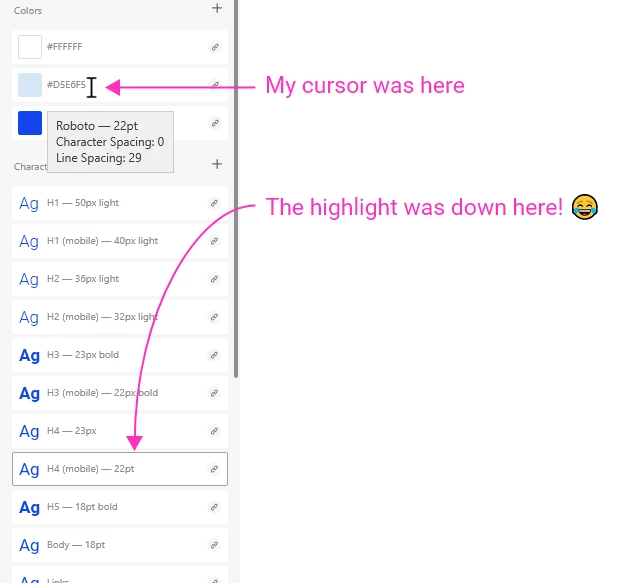
Bug: Cursor highlight in asset panel totally off from where the cursor actually is!

  • June 24, 2020
  • 1 reply
  • 1111 views

Hi there,


This has happened a few times. I'm unsure what triggers it. I'm on an HP laptop with Xd running on my 2nd monitor. So far, everything's been working fine. I was moving artboards around and copy-pasted an artboard from one file to another. When I selected a layer to apply a different color, my cursor highlight was so far below where my cursor actually was there was no way for me to select the color! ("Xd highlighting bug 1")


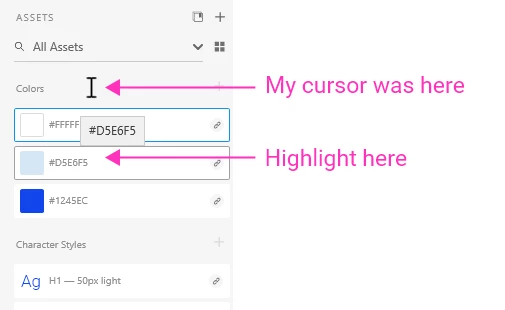
I just tried typing something into the asset search and it got much closer, but was still maybe 50-60 px "down" from my mouse... ("Xd highlighting bug 2")


Closing and re-opening the file fixed it, but thought you'd like to know it's happening. 😃


How else could I help?


Thanks!
Jason

This topic has been closed for replies.

1 reply

HARSHIKA_VERMA
Community Manager
Community Manager
July 1, 2020

Hi Jason,


Sorry for the delay in response and thanks for sharing the screenshots. I am unable to replicate the same at my end on windows machine. Would you mind sharing the operating system you are wokring on along with the XD version? Please check the latest update to your graphic card drivers.


We will try our best to help.


Thanks,

Harshika

Participating Frequently
July 7, 2020

Hi Harshika,


Thanks for the reply. Xd version 28.3.12.7, Creative Cloud Sync 4.3.48.36.


I'm on Windows 10 Enterprise Version 10.0.17134 Build 17134.


I have no idea what causes it. It's infrequent and gets fixed when I restart Xd. I'll let you all know if it happens again.


What else would you need from me?


Thanks!
Jason

HARSHIKA_VERMA
Community Manager
Community Manager
July 7, 2020

Thank you for sharing the details. Would you mind updating XD to the current version 30.2 and let us know if that helps?


We will try our best to help. 


Thanks,

Harshika