

M Prewitt at IIW
Known Participant
November 25, 2020
Answered

Cannot removed linked XD document

  • November 25, 2020
  • 1 reply
  • 1030 views

I have an XD document that links to another XD document (a style assets document). This was set up the old way before CC libraries were added to XD — as explained on this website: https://letsxd.com/videos/linked-assets. Basically the style library document is saved to the cloud, and then it can be set up as a linked document in another XD document, and all of its components and styles become available in the new document assets.


The problem is that I cannot figure out how to un-link that document. I want to swap out the old style library for a new one. But I cannot delete any of the individual assets that are linked (including ones that were not used), nor can I find any way to unlink the whole linked document. It seems like there should be a "Remove linked asset library" control somewhere, but I cannot find it!


I don't want to delete the source file, but rather remove the connection.
    This topic has been closed for replies.
    Correct answer XD5C3F

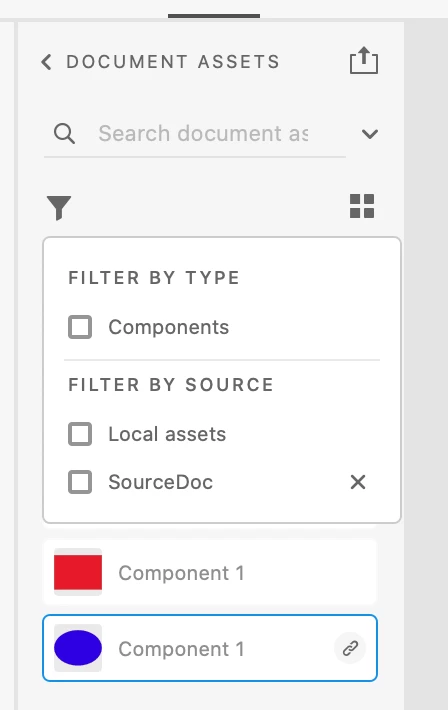
    Hello. You can unlink the source document the following way: 1. click on the filter icon on the Document Assets panel and then 2. click on the x button next to the Source document name. This sequence will unlink the source document and remove all the assets that belong to the source doc.

    1 reply

    XD5C3FCorrect answer
    Participant
    December 2, 2020

    Hello. You can unlink the source document the following way: 1. click on the filter icon on the Document Assets panel and then 2. click on the x button next to the Source document name. This sequence will unlink the source document and remove all the assets that belong to the source doc.

    M Prewitt at IIW
    Known Participant
    December 3, 2020

    Thanks for the tip (I would never have expected to need to click the filter icon—so unintuitive!), but it doesn't seem to work. See my screenshot below. The linked document appears in the popup, but there is no "X" button when I mouse over it.


    M Prewitt at IIW
    Known Participant
    December 3, 2020

    Sorry, please excuse my previous post. It looks like I had already migrated that one to CC libraries, after my initial problem and not finding any solutions. If I go to an even older document that has the old style library links, your solution works perfectly.