
Participant
June 23, 2021
Question

Collaboration problems in team of 5 designers

  • June 23, 2021
  • 1 reply
  • 1038 views

Hi Adobe team,

We are team of 5 designers in a big company. We are trying to work on the same files. And we have lots of problems that makes our collaborative work impossible 😞

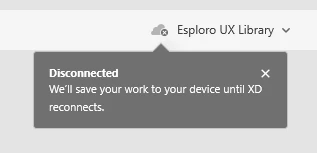
  • After saving my file in Cloud, I cannot update it. I just have this "broken cloud" icon all the time.

    And when last time it finally connected to the cloud, instead of saving and updating my last changes, it just returned to the previous display, and I've lost all of my changes that I've made when I was "disconnected". 
     
  • When my teammate shares the file with me - I cannot edit it. I'm making my changes, then I'm trying to save them, and getting this endless spinner next to the file name. So I can't save my changes, and I need to save separate file on my computer, and send it to a file owner by email, so he will be able to copy my changes to his file... this is not what you expect from "team collaboration" features. 

I will be happy to get any help or support, meanwhile we are very upset and disappointed, and checking possibility to move to Figma, because collaborative work in growing team is super important, and now in XD it's just impossible 😞

    This topic has been closed for replies.

    1 reply

    Rishabh_Tiwari
    Legend
    June 23, 2021

    Hi Yulia,


    We're so sorry to hear about the trouble. Please share a few more details like:


    1. A screenshot of the about XD info page.
    2. Does this happen with all the collaborators or only with specific collaborators.
    3. Please ensure that all the collaborators are on the latest version of Adobe XD which is 41.0.12 and the Creative Cloud Sync which is 4.15.


    We're here to help, just need more information.


    Regards

    Rishabh

    Participant
    June 24, 2021

    Hi Rishabh, thanks for the quick responce, 


    1. A screenshot

    2. with all


    Yesterday, in addition to this post, I contacted the Adobe support team, we've made some checks, and he advised me to contact our company IT team to update various network endpoints for Creative Cloud. He sent me that link https://helpx.adobe.com/enterprise/kb/network-endpoints.html#sa_src=web-messaging . I will update you if it helped.


    Thanks
    Yulia

    Rishabh_Tiwari
    Legend
    June 25, 2021

    Thanks for confirming. Feel free to reach out if you need further assistance.