
Participant
February 26, 2018
Question

Colors asset seems buggy

  • February 26, 2018
  • 1 reply
  • 200 views

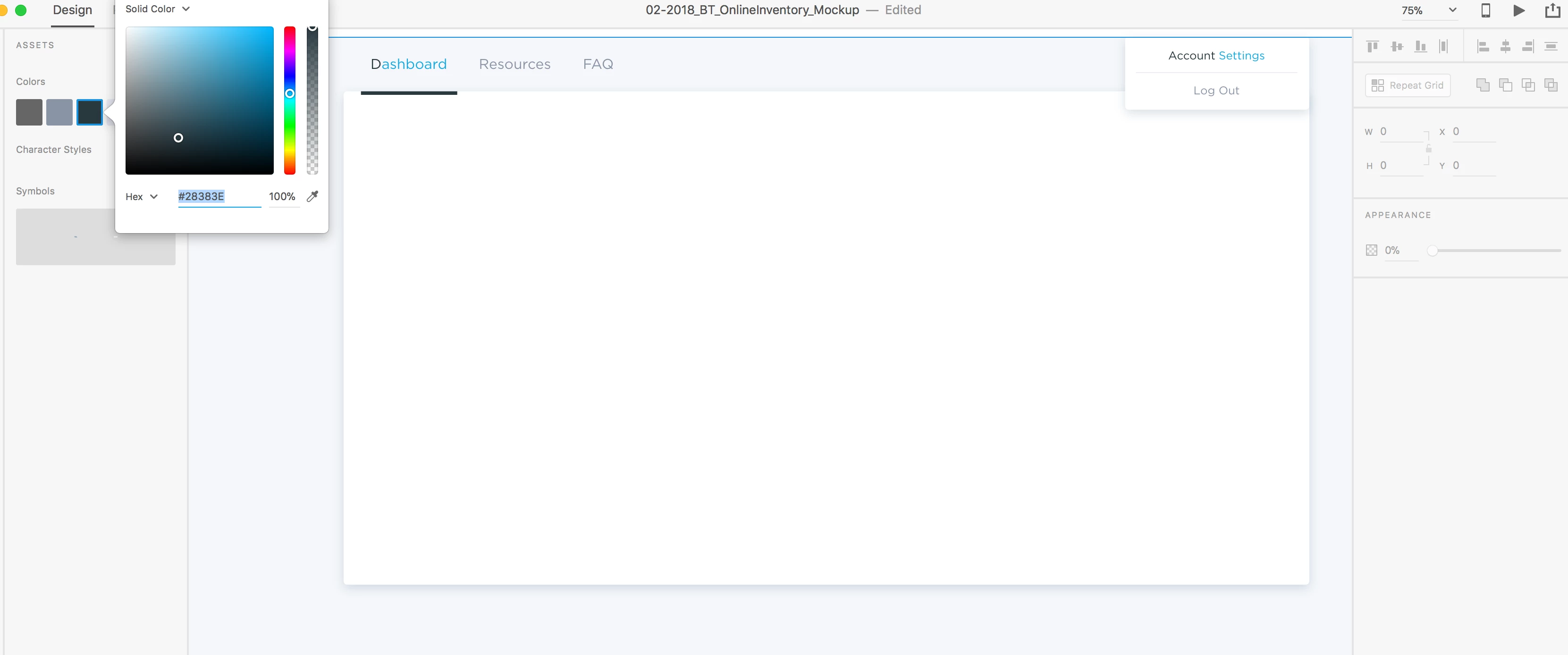
When I edit the colors asset, it seems to miss characters. A lot of times it's either the first letter or first word in a phrase. I've retyped and restarted and so far I'm just not sure what the issue is or if I'm just missing something obvious.
This topic has been closed for replies.

1 reply

Preran
Community Manager
Community Manager
February 27, 2018

Did not quite get what you meant by "miss colors". Can you provide me with details on reproducing your issue? I tried editing colors and I see no problems.

Thanks,

Preran

Participant
February 27, 2018

Hi! It misses characters, not colors. So when I go to edit the color in the assets panel, it doesn't affect the entire word or phrase. Like in the image above, only the "D" in Dashboard changed colors. And only the "Account" in Account Settings changed.

Thank you!

Preran
Community Manager
Community Manager
March 1, 2018

Apologize for the delay in my reply. This is what I did.

- Selected a word on the canvas

- Moved between colors that I had added to the Colors panel

- In every instance, the whole word changed to the selected color, and not just a specific character.

I was able to reproduce your issue only when I had selected a specific character in the word, and not the whole image.

Let me know if I am doing the right thing in reproducing your issue.

Thanks,

Preran