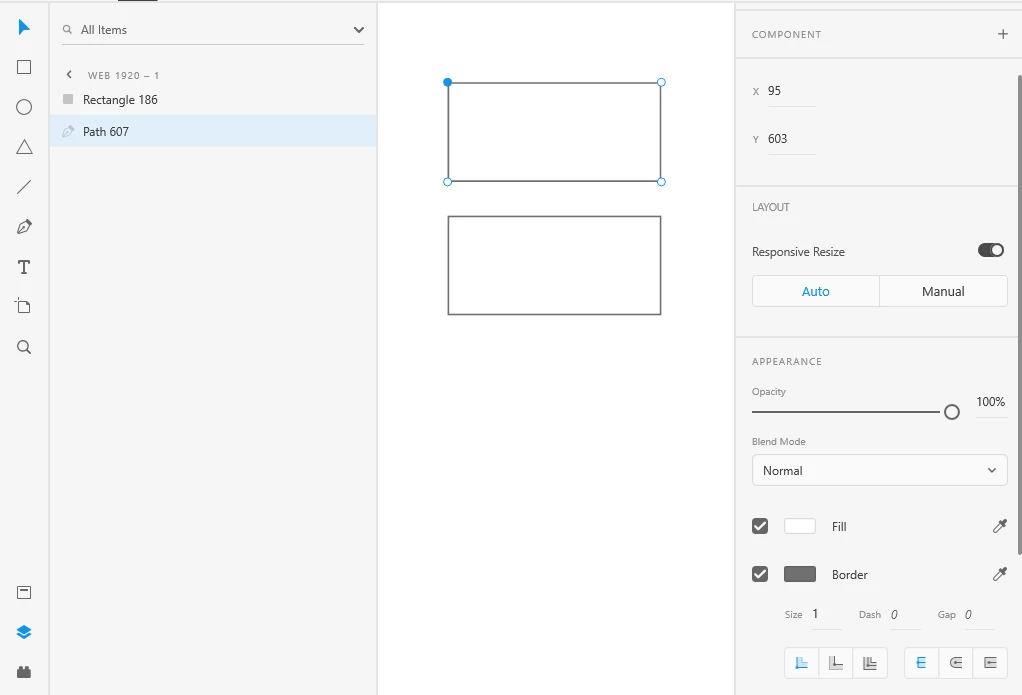
You might have accidentally converted the rectangle to a path. If the icon on the rectangle layer is the pen tool icon, instead of the rectangle, it's a path. You lose the option to set rounded corners, when the layer is a path.
Converting to a path happens if you double click a rectangle and change some property (color, size, or anything else).
Simply make a new rectangle in the component, and be careful with clicking. I advise you to use Ctrl/Cmd-Click to select things, because this way you can't convert to path by accident.
If you notice that you are in path mode (you will see 4 small circles in the rectangle corners, where the points are), press Escape or undo, to revert it to a rectangle. If you have closed the document or edited too far ahead after this, you can't really go back to a rectagle and you will have to make a new one.


 AdChoices