
dianad54380818
Known Participant
February 24, 2020
Answered

[Design]-Paste Interaction option is grayed out in XD.

  • February 24, 2020
  • 4 replies
  • 4019 views

Trying to copy-paste some interactions and when I right-click where I want to paste the interaction, the option is ghosted. Need a solution for this, please!
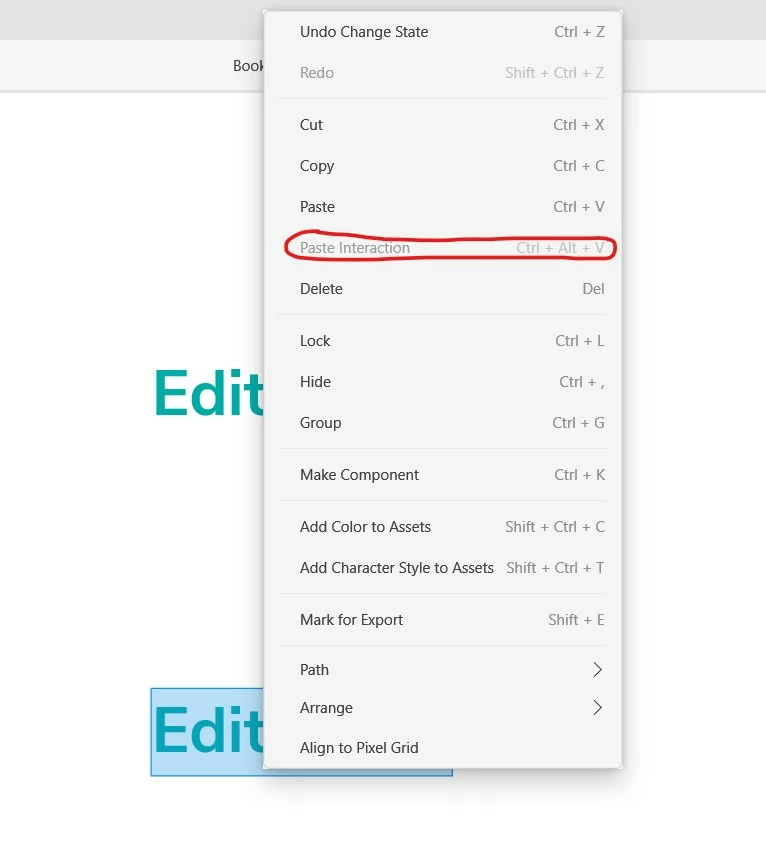


<The Title was renamed by moderator>


This topic has been closed for replies.
Correct answer HARSHIKA_VERMA

Hi Donni,


Thank you for reaching out and sorry to hear that you are unable to paste the interactions in XD.  We don't copy / paste inherited interactions except for when we copy the entire component. The interaction should only be carried over if it was on the main component. 


Thanks,

Harshika

4 replies

Donni Honig
Participant
November 3, 2020

Hey there,


Recently tried using the "Paste interaction" feature in XD, unfortunately it's greyed out in all instances.

See video below:

HARSHIKA_VERMA
Community Manager
HARSHIKA_VERMACommunity ManagerCorrect answer
Community Manager
November 4, 2020

Hi Donni,


Thank you for reaching out and sorry to hear that you are unable to paste the interactions in XD.  We don't copy / paste inherited interactions except for when we copy the entire component. The interaction should only be carried over if it was on the main component. 


Thanks,

Harshika

dianad54380818
Known Participant
March 16, 2020

I can't get interactions to paste. I posted about this issue a month ago and received a couple of troubleshooting questions from Adobe Support. However, it has now been 2 weeks since I replied to their last question and have yet to receive a reply. Another XD user commented on my post saying she's facing the exact same issue.


Here is a link to the post: https://community.adobe.com/t5/adobe-xd/design-paste-interaction-option-is-grayed-out-in-xd/m-p/10983486?page=1#M25335


The link above contains all the screenshots you'll need to answer any questions about the process that's leading me to this issue, I promise.


Could someone please reply to this soon? My workflow has slowed down severely and it's frustrating when it takes so long to get a reply from Adobe Support.


Thank you.


{Renamed By MOD}

Rishabh_Tiwari
Legend
March 16, 2020

Hi Diana,


We're so sorry for the delay in response. I did check the last post initiated by you with all the details and tried replicating the same and as Harshika mentioned in the last post that we can paste the interaction on the same document(screenshot attached) however unable to do so on a different document. So to identify the root cause, we'll appreciate, if you can share a small video of the workflow that you are following to copy the interaction.


Regards

Rishabh

dianad54380818
Known Participant
March 17, 2020

Hi Rishabh,


Thank you for your reply. Here is a quick video showing me copying the interaction from an element and being unable to paste the interaction to a different element in the same component on the same artboard:

https://www.dropbox.com/s/tiw0gcde93vozol/Cannot%20Paste%20Interaction.mp4?dl=0


Please let me know if I'm doing anything wrong since, as you can see, the 'Paste Interaction' option is greyed out.

riascureman
Inspiring
March 15, 2020

I'm having this exact same issue.

HARSHIKA_VERMA
Community Manager
Community Manager
February 24, 2020

Hi Dianad,


Thank you for reaching out and sharing your observation with us. I tried copy pasting the interactions  at my end on windows 10 machine and noticed that If I am copying the interaction and pasting it on a same document then paste interaction option is available. However, if i try to copy the interactions and paste into a new document then the option if greyed out. 


I would like to confirm if you are trying to paste the interaction within a document or into a new document. We will try our best to help.


Thanks,

Harshika

dianad54380818
Known Participant
February 25, 2020

Hi Harshika, thanks for your reply. I am also on a Win10 machine and am working in the same XD document and on the same artboard. I'm trying to copy the interactions from one component state and paste them into a second state within the same component. I also tried copying and pasting them one-by-one and it still won't work.


Edit: I just tried pasting an interaction on an element that isn't part of a component and the Paste Interaction is still greyed out. Can't seem to find a single instance where I can paste an interaction.

Preran
Community Manager
Community Manager
February 27, 2020

Can you confirm that you are doing the following?


To apply the defined interaction to another object, select the object or the artboard, select copy, click on the destination object or artboard, and in the right-click context menu, select Paste Interaction.