
Participant
January 21, 2020
Answered

[Design]-Replacing a components doesn't show green plus or arrow on windows in XD.

  • January 21, 2020
  • 2 replies
  • 1171 views

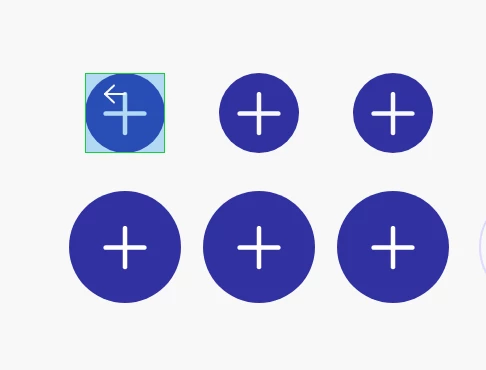
While replacing component on adobe xd on windows 10, unlike shown in tutorials, it does not show any green plus or arrow sign as a guide which would be helpful to release mouse on right location. Any idea?
 

<The Title was renamed by moderator>

This topic has been closed for replies.
Correct answer mhiremat@adobe.com

Hi iheathers,

 Thank you for using Adobe XD, In windows 10 green plus or mark is not shown instead of that the entire component is highlighted with green border, ( In mac the green arrow mark is shown ), you want this feature added to be Adobe XD for windows 10 here is the link, Adobe XD : Feature requests, https://adobexd.uservoice.com/ and get voted!


Regards,

Ashwini M Hiremath.


2 replies

Participant
February 28, 2021

I have a mac and do not see a green arrow. Mine has a green link symbol instead.

Participant
March 31, 2021

I have the same issue as AmyLouise -- on a mac. What's with the green link symbol? It didn't replace the nested component, but just placed a new one over the existing one. 

mhiremat@adobe.comCommunity ManagerCorrect answer
Community Manager
January 21, 2020

Hi iheathers,

 Thank you for using Adobe XD, In windows 10 green plus or mark is not shown instead of that the entire component is highlighted with green border, ( In mac the green arrow mark is shown ), you want this feature added to be Adobe XD for windows 10 here is the link, Adobe XD : Feature requests, https://adobexd.uservoice.com/ and get voted!


Regards,

Ashwini M Hiremath.