
Exit
  • Global community
    • Language:
      • Deutsch
      • English
      • Español
      • Français
      • Português
  • 日本語コミュニティ
  • 한국 커뮤니티
0

Font missing

Advisor ,
Nov 08, 2019 Nov 08, 2019

I get this font missing message altough the font ain't missing. This happens when I already have the font family installed and it also occurs altough Adobe webfonts have been applied as it does automaticly. In the instances where I didn't have the font prior to opening the file and when the webfont procedure applies the font, I check my CC font panel. It is there in the panel, it's available in the fontlist in XD and it is visable in the document. However this yellow icon with the text "missing fonts" is still there in the XD UI. In other words it's always there.

Windows 10. All up to date on all applications. 
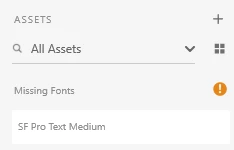
 

fontmissing.png

224
Translate
Report
Community guidelines
Be kind and respectful, give credit to the original source of content, and search for duplicates before posting. Learn more
community guidelines
Adobe Employee ,
Nov 08, 2019 Nov 08, 2019
LATEST

Thanks for the feedback. I will check with the team to see if this is a known issue.

Translate
Report
Community guidelines
Be kind and respectful, give credit to the original source of content, and search for duplicates before posting. Learn more
community guidelines