Exit
  • Global community
    • Language:
      • Deutsch
      • English
      • Español
      • Français
      • Português
  • 日本語コミュニティ
  • 한국 커뮤니티
2

Gradient tool not showing at all

Explorer ,
Sep 27, 2020 Sep 27, 2020

Hi. When I draw a shape using pen tool, set its fill to linear gradient (same goes for radial gradient), the gradient gets applied but there is no gradient tool visible on screen that would allow me to change the gradient direction. Can you please fix this... ? I am using XD version 33.1.12.4.

2.8K
Translate
Report
Community guidelines
Be kind and respectful, give credit to the original source of content, and search for duplicates before posting. Learn more
community guidelines

correct answers 1 Correct answer

Community Expert , Sep 27, 2020 Sep 27, 2020

It's there. just zoom out. like on my screenshot.

Happy Designing.
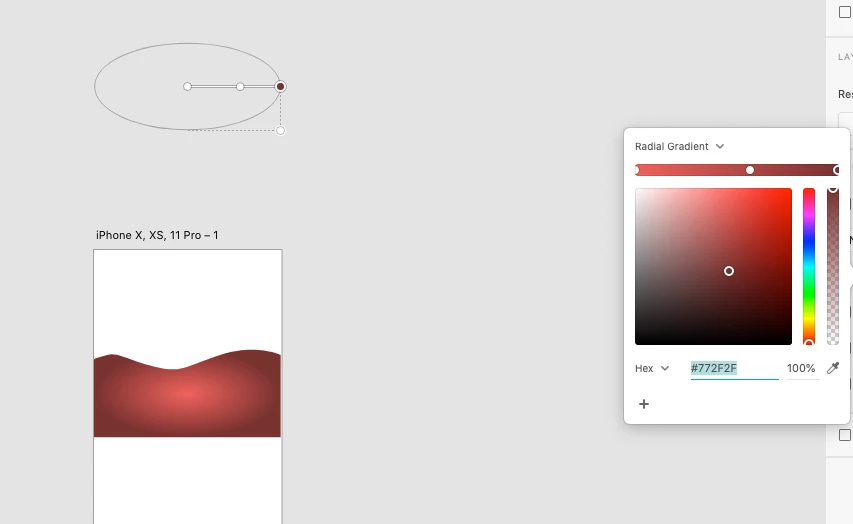
Screenshot 2020-09-27 at 12.57.15.png

PS: This is the community for Adobe Tools, not Adobe product support.  https://adobexd.uservoice.com/

Translate
Community Expert ,
Sep 27, 2020 Sep 27, 2020

It's there. just zoom out. like on my screenshot.

Happy Designing.

Screenshot 2020-09-27 at 12.57.15.png

PS: This is the community for Adobe Tools, not Adobe product support.  https://adobexd.uservoice.com/

Translate
Report
Community guidelines
Be kind and respectful, give credit to the original source of content, and search for duplicates before posting. Learn more
community guidelines
Explorer ,
Sep 27, 2020 Sep 27, 2020

Oh wow, thank you. I zoomed out and now I can see the gradient annotation tool (it's like a mile away from the shape) but when I try to bring them together it's not easy... It seems they are somehow "locked away" from each other (if I try to bring gradient tool closer to the shape it just won't cooperate; the opposite is also true: if I try to bring the shape closer, the tool just "runs away" from the shape so it keep the same big distance). Not sure why this happens... I drew new shape but the same thing happens.

P.S.

Sorry, I wasn't aware of that, should I re-locate this post to the uservoice section... ?

Translate
Report
Community guidelines
Be kind and respectful, give credit to the original source of content, and search for duplicates before posting. Learn more
community guidelines
Adobe Employee ,
Sep 28, 2020 Sep 28, 2020

Minor correction: adobexd.uservoice.com is a feature request database and is not monitored by product support. This Community Forum is monitored by product support, and is a great place to get these questions answered. Thanks for contributing!

Translate
Report
Community guidelines
Be kind and respectful, give credit to the original source of content, and search for duplicates before posting. Learn more
community guidelines
Explorer ,
Sep 27, 2020 Sep 27, 2020

I think I found out why this happens.


My initial artboard size was 1920 x 1080 px. During the design process I expanded the artboard vertically (now is around 6000 px). So, when I draw a shape BELOW-the-fold the gradient annotation tool is "tied" to above-the-fold section of the artboard. Long story short: draw your shape above-the-fold (above the blue dotted line), apply the gradient (set colors and direction) and only then drag the shape wherever you want it (in my case below-the-fold / footer).

Translate
Report
Community guidelines
Be kind and respectful, give credit to the original source of content, and search for duplicates before posting. Learn more
community guidelines
New Here ,
Dec 08, 2020 Dec 08, 2020

This doesn't work for me. I am not drawing a new shape but using existing logo. When I copy-paste it above the fold the same thing happens, the gradient tool is always on the same distance from the logo and there is no way to use it proparely.

Translate
Report
Community guidelines
Be kind and respectful, give credit to the original source of content, and search for duplicates before posting. Learn more
community guidelines
New Here ,
Jan 01, 2021 Jan 01, 2021

I have the same problem
This problem has not been fixed in the new update yet
Please fix this problem as soon as possible
It's very annoying

Translate
Report
Community guidelines
Be kind and respectful, give credit to the original source of content, and search for duplicates before posting. Learn more
community guidelines
New Here ,
Jan 10, 2021 Jan 10, 2021

Same problem here, this is not working.

Translate
Report
Community guidelines
Be kind and respectful, give credit to the original source of content, and search for duplicates before posting. Learn more
community guidelines
Community Beginner ,
Jan 21, 2021 Jan 21, 2021

Yep same here, very annoying, almost useless when it happens

Translate
Report
Community guidelines
Be kind and respectful, give credit to the original source of content, and search for duplicates before posting. Learn more
community guidelines
Explorer ,
Mar 15, 2021 Mar 15, 2021
LATEST

I updated XD to the latest version and also let Windows update its thing and now it works perfectly.

Translate
Report
Community guidelines
Be kind and respectful, give credit to the original source of content, and search for duplicates before posting. Learn more
community guidelines
Community Beginner ,
Mar 11, 2021 Mar 11, 2021

Same here.  Gradient tool disappeared after application of the gradient


Translate
Report
Community guidelines
Be kind and respectful, give credit to the original source of content, and search for duplicates before posting. Learn more
community guidelines
