
Participant
May 9, 2018
Answered

Grid Layout “Linked Margins” change to “Different Margins” automatically

  • May 9, 2018
  • 1 reply
  • 6023 views

I'm fighting with this the whole day and I can't seem to get it to have the same value for left-right margins.

Every time I change the value in "Linked margins" it switches to "Different margins" with different left and right values.

And what's even more interesting is that I can set the Linked margins to 100px but can't do the same for 101px or 101.5px (what I need).

I think it might happen because "Gutter width" option is never changing according to the margins I'm trying to setup (unlike Column width).

Screenshot of what happens when I setup 101px on Linked margins (XD switches to different margins by itself):
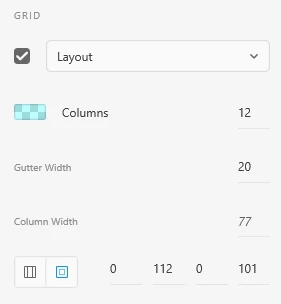
Can anyone help?

This topic has been closed for replies.
Correct answer Randy Edmunds

I'm sorry I didn't explain myself well.
What I meant is that Gutter Width is only changeable when I manually change it, but the automatic re-calculation based on Fixed margins won't work.
This is basically what I meant since the first post, that I find it strange you can only set Gutter Width manually but it won't get into XD's automatic re-calculations no matter what.

What if I just want to have a new document with 150px left/right margins and I want XD to do the Gutter Width and Column Width math for me? (instead of change fixed margins to different margins).

Thanks.


You're correct that there's currently no way to do that. Here's how it currently works:

When you create a new artboard, the Layout Grid is given the default Number of Columns, Gutter Width, and Margins. Then Column Width is calculated and rounded to nearest integer. Finally, the Margins are adjusted to make Layout Grid values add up to artboard width.

Randy

1 reply

Randy Edmunds
Adobe Employee
Adobe Employee
May 9, 2018

Whole numbers are enforced for all values so that all columns are pixel-aligned. Layout Grids that do not enforce pixel-alignment of columns result in artwork that can be blurry, or columns widths that are not consistent.

When setting up a Layout Grid, all of the values must add up to the width of your artboard. Based on these values: Columns: 12, gutter: 20, column width: 77, right margin 112, and left margin: 101, then your artboard width is: 12*77 + 11*20 + 112 + 101 = 1357px.

Click on the "Linked margins" button to re-center the grid. The easiest way to go to next incremental amount of any field without breaking linked margins (i.e. uncentering) is to use Shift+up/down arrows in each field.

Hope this helps,

Randy

FrozenGodAuthor
Participant
May 9, 2018

Yea, I suspected that but is there a way to let XD decide column width and gutter width automatically based on the margins I set?
So if let's say I have 101.5px Fixed margins, why XD isn't automatically setting the gutter width to 21px and column width to 77px (this works for me when I setup 101.5px fixed margins).

Randy Edmunds
Adobe Employee
Adobe Employee
May 9, 2018

Updating most fields adjust the Column Width first, then the Margins, if necessary. Try setting Margins first, then setting Gutter and Column Width.

Randy