
Participant
December 11, 2018
Answered

group assets

  • December 11, 2018
  • 1 reply
  • 423 views

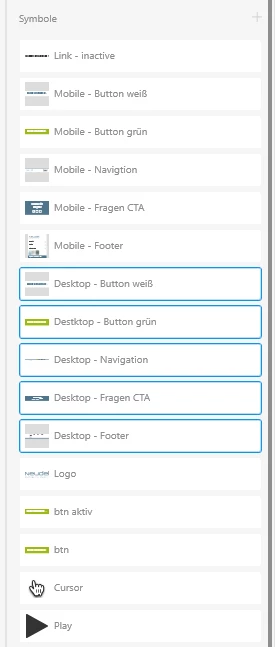
It would be great if we could group the assets by viewports.


If I have a larger project, with multiple viewports, I also have multiple assets for each viewport. Currently all are listed below each other, if you had a folder for each viewport, that would be quite good.

Just an example:
Marked Desktop Symbols in one group.
Other Mobile Symbols in one group.
This topic has been closed for replies.
Correct answer Preran

I am guessing that these are the feature requests you are looking for:

Create and organize symbols into folders – Adobe XD Feedback : Feature Requests & Bugs

Collapse / Expand all folders in the layers panel. – Adobe XD Feedback : Feature Requests & Bugs

If that is correct, please upvote these requests to stay tuned to the latest announcements.

Meanwhile, some of the features in an upcoming update should ease your pain when searching within the panels.

Also see

How to use layers to organize objects in Adobe XD.

Use the Assets panel to manage assets and symbols in your project. 

Thanks,

Preran

1 reply

Preran
Community Manager
PreranCommunity ManagerCorrect answer
Community Manager
December 11, 2018

I am guessing that these are the feature requests you are looking for:

Create and organize symbols into folders – Adobe XD Feedback : Feature Requests & Bugs

Collapse / Expand all folders in the layers panel. – Adobe XD Feedback : Feature Requests & Bugs

If that is correct, please upvote these requests to stay tuned to the latest announcements.

Meanwhile, some of the features in an upcoming update should ease your pain when searching within the panels.

Also see

How to use layers to organize objects in Adobe XD.

Use the Assets panel to manage assets and symbols in your project. 

Thanks,

Preran

nllsbnlfAuthor
Participant
December 12, 2018

thanks