Participating Frequently
July 7, 2022
Answered

how do I import my currently live website into Adobe XD?

  • July 7, 2022
  • 2 replies
  • 13588 views

I just purchased Adobe XD purely for this purpose.

We are currently working on a site makeover and it is currently hosted and live.

I expected I could import it into XD to more easily provide and communicate feedback/comments to my web developers.

If I cannot do this, I am going to cancel this purchase and request a refund.

Any instruction I find says to save to PDF, then open that via Adobe Illustrator, and copy and paste into XD. There is no Adobe Illustrator option for me.

Can someone please help?


    This topic has been closed for replies.
    Correct answer Spas K.

    PS, all of the files that I am trying to import or copy/paste are PNG and it's supposed to be acceptable file format.  Again, I bring them in, see them, name them, save them, but then when I select them to make notes, my screen is blank.


    Hey there. It would be nice if you can share a screenshot, although I suspect what might be happening.


    Everything in Xd must be on an artboard in order to be visible in the prototype. If you just paste a PNG inside Xd you can see it, but it's probably in the "Pasteboard" - i.e. in the space outside any artboard.


    You must first create an artboard with the size of the screen you want to show. When you're first creating your Xd file, make sure you click on one of the artboard options on the home screen, for example Web 1920. You will then see only one artboard on your screen. Make sure you paste while it's selected, and if the image is outside of it, drag it in there.


    To make more artboards, select this one by clicking on its name and press Ctrl/Cmd + D. Make sure all your images are inside an artboard. You can also make one with a custom size or use presets while using the artboard tool - Press A, or select it from the tools pane:



    If you scale the artboard vertically from the bottom, you will see a dotted line - this represents the viewport, i.e. what part of the screen is visible, while everything below the dotted line you will have to scroll in order to see when viewing the prototype.
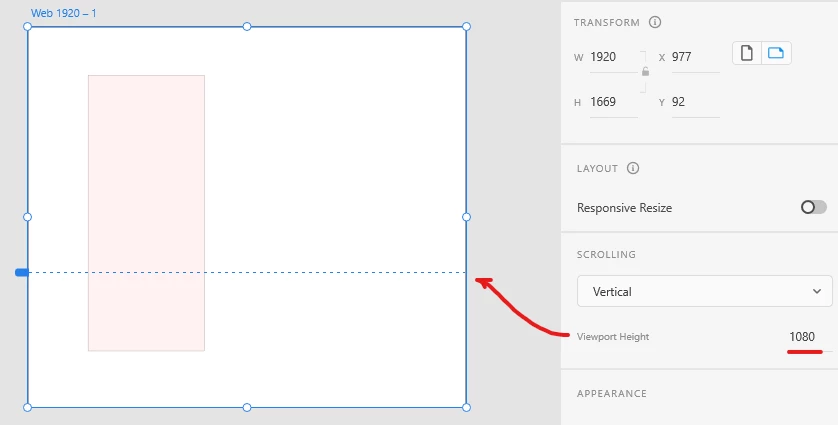
     

    About the screenshots, browsers can take full size screenshots - the whole height of the page, without having to make multiple and stitch them together. If you're running Chrome, you must do the following

    1. Press Ctrl-Shift-P (or Cmd-Shift-P on a Mac).

    2. Ctrl-Shift-P (or Cmd-Shift-P on a Mac).

    3. Type "screenshot" in the command field, and you will see "Take full size screenshot", which will capture the whole page top to bottom and save it to your PC.


    On Firefox, you can simply right click anywhere, choose Take Screenshot, and choose "Save Full Page" on the top right.


    So, you would make the full size screenshot, paste it in an artboard, resize it so it matches the height of the screenshot, and your prototype will pretty much function like your website in terms of scrolling. Then you will just have to make the notes with drawing rectangles on top of the screenshot + text areas on top of them or something like that.


    If you're still having troubles, let us know. The software is specialized and has a bit of a learning curve.

    2 replies

    Spas K.
    Community Expert
    Community Expert
    July 7, 2022

    Hey there, Brenda! Short answer: When I've had to make re-designs like this I would make a screenshot of the whole page, paste it in Xd and make changes on top of it. That is the easiest and least troublesome way to do it, albeit a bit dirty.


    Xd is an app for user interface and experience design. In most cases you would use it to create vector graphics and interface elements, with some limited raster graphics editing ability, but you won't very often modify existing designs created outside of Xd.


    Adobe Xd and your browser are very different environments. Your live website is built with code (html, css, javascript), and that code is rendered by the browser. Xd uses a different kind of code, and the relationship between its elements are different than how html works.


    Unfortunately, Adobe Xd can't just read that code and interpret it as vector elements. There is some conversion that needs to occur. You need to somehow capture the vector elements from the webiste (text, structure elements, .svg icons etc.), along with raster images into one file - a PDF file can hold all that in the same place.


    Adobe Xd can't interpret PDF files and convert them to vector elements as of now. Reason probably being it's a very rare workflow and it will probably take too much time away from other more important things on the agenda. So your option would be to import the PDF into Illustrator, which can read it properly and convert the graphics to a format Xd can understand. At this point you can just copy them from Illustrator and paste in Xd. It is likely all your text will be turned into outlines and you won't be able to edit it anyway. It most definitely won't be dynamically editable elements like text fields and so on, so it kinda defeats the purpose of doing it in the first place.


    Participating Frequently
    July 7, 2022

    hi again Spas, so I went thru making rolling screenshot copies of pages I want to import or copy/paste into XD.  I've tried both the importing and a copy/paste.  It appears inside XD, I name the file, save, and while I see a file listing for the file name, if I click on it it's just a blank white page so I really don't understand where it is or what's going on.  Not near as user friendly as I expected.  I've spent about six hours trying to figure this out today and pretty close to giving up and asking for a refund.  Really appreciate your help!

    Participating Frequently
    July 11, 2022

    Hey Brenda, sorry you're still having struggles. I'm not sure if I understand the issue. You might be having some performance issues or something else. I personally don't find it clunky in this aspect particularly (navigating around the artboards), but I've been using similar software for 12 years now so maybe I'm just used to it all 🙂


    There's no "Comment" functionality while designing in Xd, but there is such in the web prototype when you publish it. If you have all your artboards set up with the pages, you can go to the Share tab at the top left and then on the right create a link for "Design Review". Once it's published, you can go to the address and add comments with pins on the document.


    You might be right that you don't specifically need an interface design tool to just give comments on screenshots. If you look for "design feedback tools" on google, I'm sure a lot of light browser apps will pop up, and you can try one of them out. I haven't used one myself, so I couldn't recommend anything specifically.


    Thank you again Spas, I think as great as the XD tool is, it's just overkill for this particular need and I am better suited with a simpler tool, which I have found, called Markup Hero.  So that's where I'm at for now, but I am not ruling out XD in the future.  Deeply appreciate your thoughtful comments and assistance!  You give Adobe a good name!

    HARSHIKA_VERMA
    Community Manager
    Community Manager
    July 7, 2022

    Hi @Brenda B.251642843hnc,

    Welcome to the XD Community.

    Thank you for reaching out. We would like to inform you that you can use the plugin "Web Export," which allows you to extract HTML and CSS from your design.


    You can also use Adobe XD plug-ins that allow for extracting HTML and CSS. Select Plugins > Discover Plugins and search using the webHTML, and CSS keywords.


    Sharing a video from one of our Youtube experts on this topic.


    Hope it helps.


    Thanks,

    Harshika

    Participating Frequently
    July 7, 2022

    Yes, thanks Harshika, I'm still a little confused though from where am I going to 'select plugins'?  This sounds like WP and our new site is using Laravel.  Also, the video is talking about designing in XD and then exporting.  Not my question.  I already have the design but need to give my developers feedback and thought XD would simplify the process.  I need to import my site into XD and it does not seem like this is possible so buying XD is not the solution I needed.  

    Participating Frequently
    July 7, 2022

    PS, hi again Harshika, I did see the browse plugins under Adobe XD but nothing comes up when searching for Web Export other than some Lightroom Desktop for photos.  I also tried 'Import' because I need to import my site into XD, not export.  Unless the plugin you mention means "export the site".  Anyway, I appreciate your help.  This is no where near as user friendly as I'd hoped.