

NewsWorld
Participant
April 20, 2017
解決済み

How to change the app language in Adobe XD?

  • April 20, 2017
  • 返信数 5.
  • 31506 ビュー

Hi guys, sorry for my informality and english.

Not more minute ago, i have update Adobe XD, the my problem is that this is, after i have loading, it appears in Chinese or another Asian language.
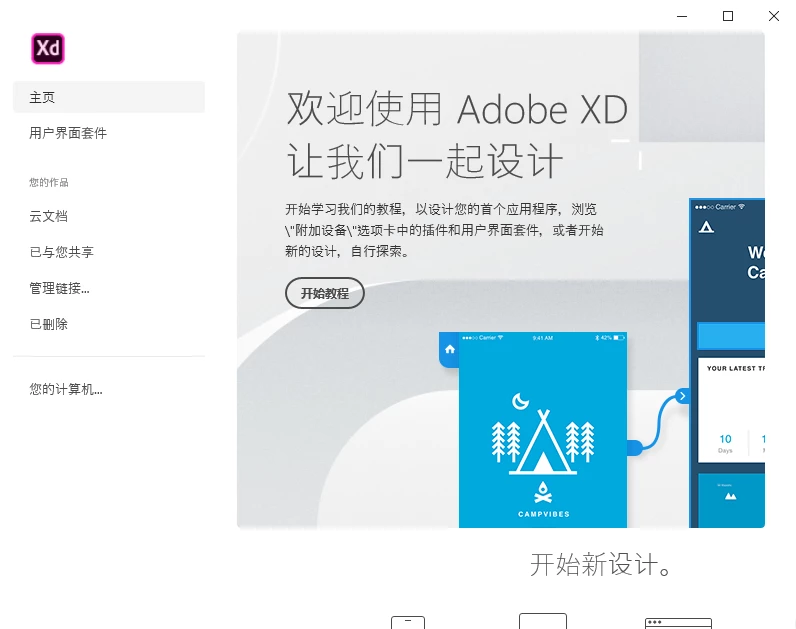
How i can change languege?


<The Title was renamed by moderator>

このトピックへの返信は締め切られました。
解決に役立った回答 Roopa P

Hi There,


Thanks for reaching out and using Adobe XD. Basically Adobe XD language can be changed from XD->Preferences->Language->Choose language and restart Adobe XD. Please follow the steps mentioned in the below link to know more about Adobe XD language subscription settings for geolocation https://helpx.adobe.com/xd/user-guide.html/xd/help/change-app-language.ug.html


Hope it helped, feel free to reach out to us if needed any further assistance and we will be happy to help..


Thanks,

Roopa Patil

返信数 5

Participant
September 12, 2021

I have the same issue.  I am paying for a bunch of licenses of Adobe XD. We are an English speaking company. All other users use the product in English. I have paid for our licenses using a credit card from an English speaking bank in an English speaking country. All apps on my computer are in English only. Yet, my app is in Chinese. Uninstall, reinstall, reboot, repeat. Nothing works to get your app to work in English. I do get a message indicating that I am only "entitled" to use the Chinese version. I'm losing patience with this and need a solution for this muddled programmer's mess asap.


Also, I attempted to follow the instructions laid out in the 2 'Correct' answers below but the menus in my app look completely different and I cannot find where language can be changed.  The app being entirely in Chinese does not help.

Participant
July 7, 2021

 l want to know how to change the language into another language. Please help


<Title renamed by moderator>


Roopa PCommunity Manager解決!
Community Manager
July 7, 2021

Hi There,


Thanks for reaching out and using Adobe XD. Basically Adobe XD language can be changed from XD->Preferences->Language->Choose language and restart Adobe XD. Please follow the steps mentioned in the below link to know more about Adobe XD language subscription settings for geolocation https://helpx.adobe.com/xd/user-guide.html/xd/help/change-app-language.ug.html


Hope it helped, feel free to reach out to us if needed any further assistance and we will be happy to help..


Thanks,

Roopa Patil

HARSHIKA_VERMA
Community Manager
Community Manager
March 17, 2020

Glad to hear you are able to change the language. Please feel free to reach out to us in the future for any query related to Adobe XD.


Thank you for Franco for your contribution on this post. You did explained it well.


Thanks,

Harshika

Participant
April 20, 2017

well, i just clicked to install the new update for XD and surprise, it started in Japanese even when my main language is already set up for Spanish.

already uninstalled and reainstalled but the issue persist.

Adobe Employee
April 20, 2017

Hi,

Are you using Windows 10? In this case please go to Region and Language Settings (open it by typing language in your Windows application menu). There you have a list of languages, they should be sorted as a priority list of your preferred languages. Spanish probably is the first in your list but it is not supported yet by XD. Probably the first supported language in your list is Japanese. Please make sure that the second language in your list is English (if this is the language you'd like to have for XD). We also support French, Deutch and Korean for the moment.

Please tell us if your problem is fixed.

Regards,

Lavinia

FrancoBits
Legend
March 17, 2020

Hello! Try making the following:

On Adobe XD > Menu > Last item > Item with chevron > English > Restart XD

NewsWorld
NewsWorld作成者
Participant
March 17, 2020

True... Sorry, thank you!

Simone VIDON
Fruitfan
Participant
May 9, 2017

I just installed Adobe XD cc (beta) on windows 10. The whole application is shown in japanese, even though I have english selected as the language the apps from the creative cloud should use. Is there a way I can change the language of the software? Since I can't read japanese, I have a hard time finding any setting in the app itself.

Thanks for your help!

Dan POPA
Adobe Employee
Adobe Employee
May 10, 2017

Adobe XD app is shown in the first supported language from the Windows Languages list as defined in Windows Settings -> Region and language settings.

Here's how you could find the Region and language settings, type Region in the Start menu:

Currently, Adobe XD CC (Beta) for Windows 10 is only available in English, Japanese, and Korean. Support for French and German will be added in an upcoming release.

So in your Region and language settings you should have English as the default language in the languages list.
You might need to add English to this list.
You can make English default by clicking on the "Set as default" button when English is selected:

And then you should restart Adobe XD for changes to be applied.

Thank you,

Dan Popa

Fruitfan
Participant
May 11, 2017

Thank you very much for your quick reply. That solved the problem. Never would have thought to look there. Thanks for your time.