
Copy link to clipboard
Copied
Hi.
Regarding development link, it is so convinient solution to sharing design spec.
But Export for Android mode looks only for mdpi sketch.
I strongly want to set Document Dpi. If already have some solution, please let me know.
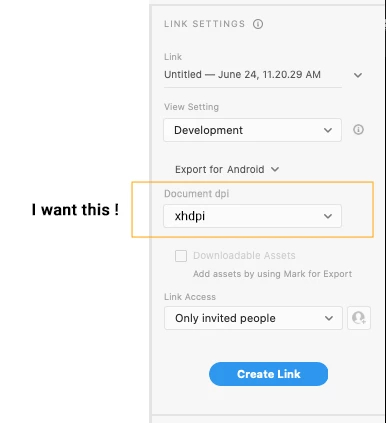
Development view will always show exactly the size inside Xd. You can't modify that, unless you scale down the elements / assets manually to half their size.
Copy link to clipboard
Copied
Hi there, can you tell us more about what you're trying to do exactly?
We used to have an option through the Batch Export window, which was a field called "Designed at", where you could set what dpi / resolution your designs were, and Xd made calculations based on that. Unfortunately, many users were confused due to the way the interface was designed and how it was worded, so the team decided to remove that feature altogether.
I raised the issue 2 years ago, since there were some cases where the "new" solution didn't work, similar to your case, but I guess the team didn't want to go back on their decision or find another solution.
Nevertheless, you can either downscale your files to fit the 1x box artboard sizes, and Xd will scale them up / down accordingly upon export. You can also have them at the xhdpi res and manually export through batch (File > Export > Batch) whatever percentages you need.
Copy link to clipboard
Copied
Hi, Thank you for your quick reply.
I mentioned about the case sharing development view like below, not about exporting assets.
Since I made a sketch as xdpi resolution, the dp unit is always x2 scale in development view.
I want to get 1/2 dp from this, somehow.
Copy link to clipboard
Copied
Development view will always show exactly the size inside Xd. You can't modify that, unless you scale down the elements / assets manually to half their size.
Copy link to clipboard
Copied
Thank you so much. Your answer is very clear.
But if so, in my opinion, dp option is less meaning, because it would be same number with pixel.
Same with assets you already mentioned, we often draw sketches other than mdpi in our work.
Document DPI concept which I drawed in first post might be good solution for us.
Copy link to clipboard
Copied
You can always submit a new feature request here on uservoice. When or if it will be implemented is still the team's decision, but you can at least show someone needs it. I didn't manage to find an existing one.
I'm still not sure what your sketches look like - if you're talking about scanned images - you can scale them down to 1x and Xd will still show their actual size at 2x, while they will get blurry in higher resolutions.
If it's designs with many vector elements, scaling will be harder, but with regular elements you should always work @ 1x, unless it's some raster game assets drawn in Photoshop or something, where you need to only scale down.
I guess I can understand if you just need the dimensions of the elements in different resolutions, that would probably justify it, although I thought when coding an app, similarly to responsive web design you mostly work with percentages, but I don't have experience in that area.
The different units seem to only be for the purpose of copying CSS, so you don't manually have to change them. In responsive design you mostly use em and rem though, with a baseline font size set, which would be similar to your request, but we still don't have that functionality for some reason.
Copy link to clipboard
Copied
Thank you.
To be specific, for apps on TV, we UI designers usually draw sketches as 1920x1080 as customary. But engineers have to implement it as xdpi side in android platform. The reason why we don't want to make sketches as x1(mdpi 960x540) is complecated things. But one of the reason is we still have a lot of previous version sketches before android platform (it is implement as pixels). So as long as we don't change, we can reuse them.
As you mentioned, it could be hard work that changing scale of all of sketches.
Our case might be rare case. But I think it is not uncommon that designers make sketches as other dpi from mdpi.
I'm sorry for my confusiong explanation. I will try to propose for new feature.
Thank you.
Get ready! An upgraded Adobe Community experience is coming in January.
Learn more