
Participant
October 7, 2020
Answered

How to go back to original zooming %

  • October 7, 2020
  • 1 reply
  • 409 views

hi,i recently started using Adobe XD and i found out that whenever i zoom in or out, i find it hard to go back to the original size i was working with plus i dont think there is an option to scroll up , down or sideways or am i missing something?


{Renamed By MOD}
 

This topic has been closed for replies.
Correct answer Rishabh_Tiwari

Hi there,


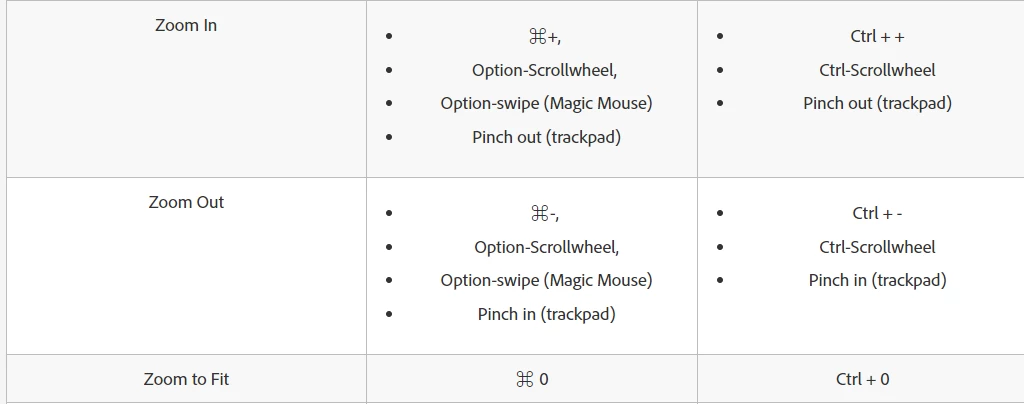
Thanks for reaching out. In case if you are zoomed in and wish to fit the artboards to the default viewing zoom percentage wherein the artboard will fit in, you can always use the shortcut CTRL+0 for Windows or CMND+0 for macOS.


Please refer to the screenshot for more information on various viewing option shortcuts:


Let us know if this helps or if you need any further assistance.


Regards

Rishabh

1 reply

Rishabh_Tiwari
Rishabh_TiwariCorrect answer
Legend
October 7, 2020

Hi there,


Thanks for reaching out. In case if you are zoomed in and wish to fit the artboards to the default viewing zoom percentage wherein the artboard will fit in, you can always use the shortcut CTRL+0 for Windows or CMND+0 for macOS.


Please refer to the screenshot for more information on various viewing option shortcuts:


Let us know if this helps or if you need any further assistance.


Regards

Rishabh

Participant
October 8, 2020

Got it, Thankss