Inspiring
January 31, 2020
Answered

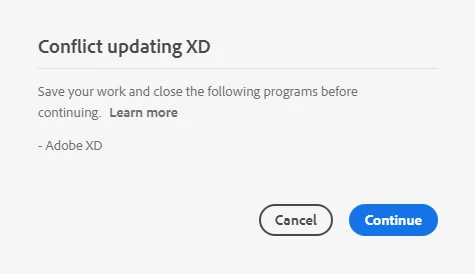
[Install]-Unable to update XD to the latest version "Conflict updating XD"

  • January 31, 2020
  • 5 replies
  • 16146 views

Unable to update XD. I have NO other Adobe application open. There's nothing in the Windows task manager that could explain why I'm constantly receiving this message when I try to update XD in the CC desktop application. There's no pending process there. I have logged in and out of my CC account and even re-booted Windows with no luck. This conflict message is constantly there preventing me from updating XD.


<The Title was renamed by moderator>


This topic has been closed for replies.
Correct answer HARSHIKA_VERMA

I appear to have found the solution. After taking control of the WindowsApp folder (so I could browse inside it). I simply deleted the Adobe XD folder (note: I did need to tell Windows to terminate [with in App Settings] the app; it was "in use" despite rebooting my system). Then I went and told Adobe CC to install it.


So, either it's a permissions issue that Microsoft may have imposed on "Windows App" programs to prevent malware (Windows Store still updates apps just fine). Or there's a process that Adobe XD keeps restarting so the install hangs due to "in use" error, but is obfiscated, and doesn't actually throw up the prompt you get when trying to delete something "in use".


Now, I did try Terminate before, but if there's a process that XD keeps starting back up...well...then the only solution is to delete the entire XD Folder before that process can be started again.


Hi All,


We're so sorry for all the trouble. Usually, this error gets resolved after terminating XD related process from the Task Manager/Activity monitor. Please close CoreSync and all Adobe related processes from the Task Manager/Activity Monitor and try re-installing. If that doesn't help try a clean install.


If you still face the issue, please get in touch with our support team using this link: https://helpx.adobe.com/in/contact.html so that we can investigate further and report it to the team.


Hope it helps.


Thanks,

Harshika

5 replies

Participant
February 1, 2021

thank you its working for me

Sine-nomine
Participating Frequently
July 23, 2020

At least you are getting it to a point where you can cancel.


"Progress is slower than usual. Working on resolving issue..."
Originally, I had started and went to bed...8hrs later it was still "Updating...(90%)". Then I tried to cancel ("x" button), for the next 1hr it was "Cancelling...". So I rebooted and then tried Uninstalling. For the next 45 minutes "Uninstalling...". Rebooted AGAIN. Tried to uninstall via Windows..."Uninstalling...." for the next 20 minutes. Rebooted AGAIN. Ran the Adobe CC Cleanup Tool.

...then tried to install the previous version. Well, it's now been 10 minutes and "Installing...(90%)", with the above message.

Photoshop had no trouble updating...


Clearly there is an issue with Adobe code communicating with Windows App framework. - Seems Adobe XD uses Windows Store/App framework.

perrybrusAuthor
Inspiring
July 23, 2020

It all went downhill when Adobe outsourced the software engineering and everything else to India. Just being honest. All that is left in the US is fluff work like marketing and promo.

HARSHIKA_VERMA
Community Manager
HARSHIKA_VERMACommunity ManagerCorrect answer
Community Manager
July 27, 2020

I appear to have found the solution. After taking control of the WindowsApp folder (so I could browse inside it). I simply deleted the Adobe XD folder (note: I did need to tell Windows to terminate [with in App Settings] the app; it was "in use" despite rebooting my system). Then I went and told Adobe CC to install it.


So, either it's a permissions issue that Microsoft may have imposed on "Windows App" programs to prevent malware (Windows Store still updates apps just fine). Or there's a process that Adobe XD keeps restarting so the install hangs due to "in use" error, but is obfiscated, and doesn't actually throw up the prompt you get when trying to delete something "in use".


Now, I did try Terminate before, but if there's a process that XD keeps starting back up...well...then the only solution is to delete the entire XD Folder before that process can be started again.


Hi All,


We're so sorry for all the trouble. Usually, this error gets resolved after terminating XD related process from the Task Manager/Activity monitor. Please close CoreSync and all Adobe related processes from the Task Manager/Activity Monitor and try re-installing. If that doesn't help try a clean install.


If you still face the issue, please get in touch with our support team using this link: https://helpx.adobe.com/in/contact.html so that we can investigate further and report it to the team.


Hope it helps.


Thanks,

Harshika
Participant
July 23, 2020

In mac I solved it. From Go > Application remove the adobe XD and update from Adobe Creative Cloud. 

sblowes_epay
Participant
June 16, 2020

I have this issue too, even uninstalling it is blocked by the same problem

HARSHIKA_VERMA
Community Manager
Community Manager
January 31, 2020

Hi PerryBrus,


We are sorry to hear you are having trouble updating XD. Would you mind trying the steps mentioned in this article: https://helpx.adobe.com/creative-cloud/kb/download-update-errors.html? If that doesn't help, please get in touch with our support team using this link so that you can get 1:1 assistance on the same.


Hope it helps.


Thanks,

Harshika

perrybrusAuthor
Inspiring
January 31, 2020

Nothing there to solve my problem. I'm not receiving an innstallation error, as explained in my post I'm receiving the standard conflict message when trying to run an update that's available in the CC desktop application. What you normally get if you have Bridge open while trying to update Photoshop etc. I don't actually get to start the update installation cause the conflict message is blocking it. As mentioned in my post, since there's no conflicts to this action there must be something wrong on Adobe's side.

HARSHIKA_VERMA
Community Manager
Community Manager
January 31, 2020

We understand your concern and sometimes I personally get this error but it always get resolved once I end up the XD processes from task manager or sometimes my XD was open. 


However, in your case as you said you have already tried these steps and rebooted your machine as well. I would suggest contacting our support team so that they can take a screen share of your machine and look for the issue. Otherwise, you can try uninstalling and reinstalling XD using the cleaner tool: https://helpx.adobe.com/in/creative-cloud/kb/cc-cleaner-tool-installation-problems.html


Hope it helps.


Thanks,

Harshika