
Participant
May 5, 2021
Question

Issue with exporting artboard to a SVG

  • May 5, 2021
  • 1 reply
  • 2054 views

When I export my artboard as an SVG - parts of the layout either move or do not appear.
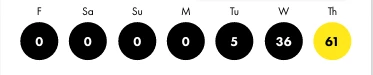
This was created in XD - everything is lined up and centered.

Exporting this as a SVG results in this:

So I have to open it in Illustrator to fix it which is not a great workflow.

Why are things moving around? Also have had a problem with pieces of the layout not even appearing in the SVG file.

This topic has been closed for replies.

1 reply

Ares Hovhannesyan
Community Expert
Community Expert
May 5, 2021

Can you share file. I am able to export without any glitch. How you export svg? Did you match all for export?

Participant
May 5, 2021

What do you mean by “Did you match all for export?” Do you mean “mark all for export?” Yes, I did this. I tried exporting the artboard with all of the SVG options - and this happens each time.


The chevron also disappears in the export - but this was a component from a different file. When I unlinked it, it appeared.

The circles and numbers are not a component, they are just circles and text. But we have many more screens to do, so this is a problem.


My ultimate goal is to get a PNG file sized to 1170 x 2532  - 460ppi. (As requested by my developer.) Exporting the artboard as a PNG even at 2x does not give the correct size.


Do you have a recommendation?


(I can not share the actual XD file because it is for a client.)


Thank you -


Ares Hovhannesyan
Community Expert
Community Expert
May 16, 2021

Ares,

Attached is an XD file to show what is happening with the SVG export. It is not exporting correctly.


Thank you for files but I can't reproduce the bug. May be you can try to group them before export?.