Participating Frequently
June 4, 2019
Answered

Nested overlays?

  • June 4, 2019
  • 4 replies
  • 1838 views

Scenario:

Main page >  Search pop up (overlay) > Search results (overlay on Search pop up.

When I run this on main page, the first pop up works but then the search results the search pop up disappears and just the search results are hovering on the main page.

After searching it seems this is a no go?  Is XD going to incorporate this?  For complex workflows this seems like a no-brainer.
This topic has been closed for replies.
Correct answer Peter Villevoye

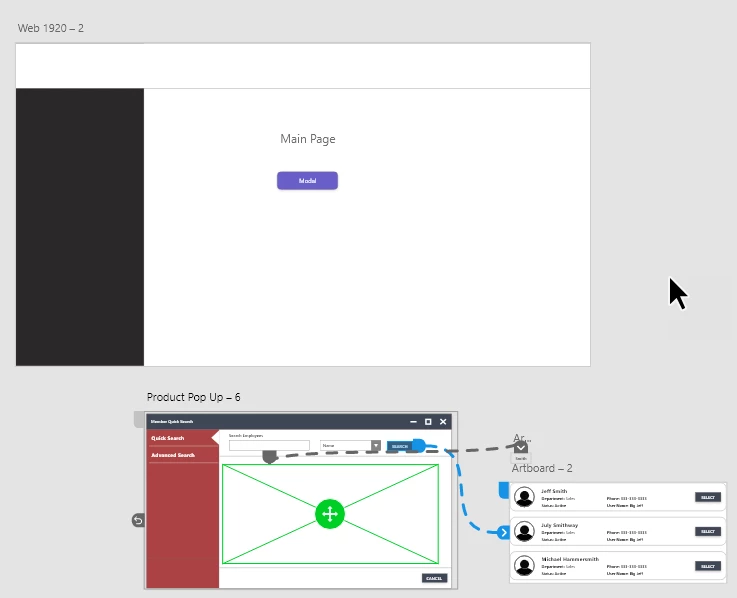
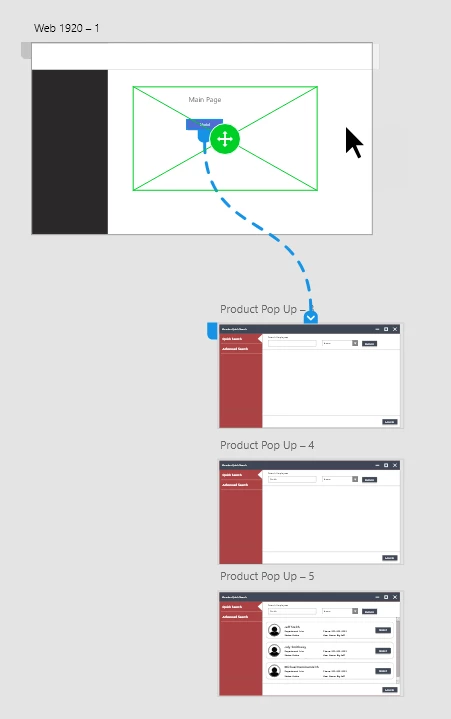
Here are the art boards

How I have to set it up due to lack overlay in overlay

How it would look if overlays were allowed inside of overlays


Well, that's exactly what I'd suggest: use 3 screens !

Screen 1: the main screen;

Screen 2: the same as 1, but with name added;

Screen 3: the same as 2, but with list of names added.

Use Dissolves to not show the whole screen changing.

4 replies

Participating Frequently
June 18, 2020

So there is no way to create Nested Menu with the Overlay method.

Cause the next set of overlay art-board doesn’t work, it shows a black screen.

Participating Frequently
June 5, 2019

Here is the link to the prototype:  Adobe XD

Script

1. Click the X button on the window to expose main page (not sure why this demo is loading the modal and not the main page on load... another bug?)

2. Click Modal

3. Click Name field (Notice how the page blinks and loads a new art board)   I should be able to just overlay the name in the field

4. Click Search (Notice how the page blinks as i has to go to a new art board)  I should be able to overlay the search results on the overlay

Peter Villevoye
Community Expert
Community Expert
June 5, 2019

The navigation is a bit jumpy, but swiping through the screens, gives the idea.

I can think of many ways to achieve a good prototype of what you're trying to let reviewers see and test. And even without any overlays. But you should regard your work in XD more as working on a mock-up, a series of make-believe screens.

Participating Frequently
June 5, 2019

Not sure I follow.  

They are choppy but that's the point, they should not be.  I should be able to keep the overlayed pop up in place and just overlay data into it without needing to load a separate art board (which is why its choppy).  After looking through feedback it appears to be a requested feature.

Nested Overlays – Adobe XD Feedback : Feature Requests & Bugs

As far as different ways to do it, I would be interested in learning if you want to give a summary.  How else would you achieve a interactive pop up on a main screen?

Peter Villevoye
Community Expert
Community Expert
June 5, 2019

Hmm... I tried to recreate something similar to what you described, but I can't get it to work.

Ideally you probably would like to have two separate overlays for one screen, showing both, on top of each other.

But the Overlay action seems to be a state in which you enter and must leave again, before going anywhere or doing anything else.

I also tried letting the second overlay be an overlay on the first overlay, but it doesn't work either.

So I guess there's no way to get another overlay on top of the other, I'm afraid...

Nevertheless, it's easy enough to make a mock-up of the process with several screens.

Atul_Saini
Legend
June 4, 2019

Hi Noquarter76, thanks for explaining the situation. In order to help you appropriately, would it be possible for you to share the link of the prototype so that we may have a better understanding. Even a sample file would work.

Thanks,

Atul_Saini