
Grokked
Participating Frequently
June 29, 2017
Answered

No "Send Link" option for XD files in creative cloud

  • June 29, 2017
  • 3 replies
  • 1873 views

In the last couple of weeks, my team has noticed that recent XD files that have been saved to Creative Cloud do not offer the option to "Send Link". The only option for new files is "Archive". What's also strange is that newer XD files show up with a smaller icon than older XD files, and the older XD files still have the option to "send link".

Any way to fix this issue? I rely on CC to be able to send my files to our developers and now I'm forced to zip each file in order to share it.
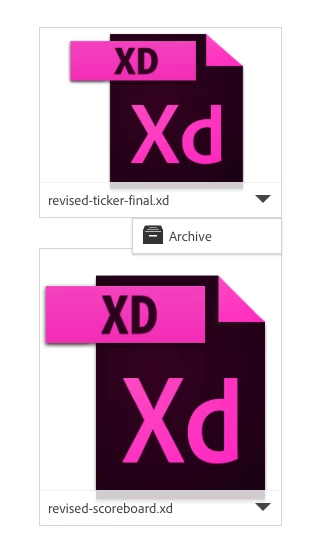
This topic has been closed for replies.
Correct answer Preran

Hi Grokked,

We were able to reproduce this issue and have logged a bug for it. I am checking to see if we have a workaround solution for it.

Thanks,

Preran

3 replies

Grokked
GrokkedAuthor
Participating Frequently
October 19, 2017

As a designer who works with a large team of developers on multiple projects, this bug is a major roadblock in our process. Unbelievable that XD has shipped with this bug still in place. Isn't the sharing of files at the core of CC?

Guys, what's going on?

elainecc
Participating Frequently
October 25, 2017

Note that this is not the expected behavior for XD. We can currently only create a prototype via the desktop application. You can share a link from the mobile companion app if it's already been shared from the desktop, but you can't create a new link from a files from the Creative Cloud.

-Elaine

Grokked
GrokkedAuthor
Participating Frequently
October 26, 2017

Not sure I understand this reply.

I can go to the list of assets in my creative cloud and share EVERY single file type in there, except for Adobe XD. How does this make any sense?

Preran
Community Manager
Community Manager
July 3, 2017

Quick update: It looks like we don't have a workaround solution for it as of yet. If I hear anything to the contrary later, I will post it here.

Thanks,

Preran

Grokked
GrokkedAuthor
Participating Frequently
July 5, 2017

Thanks for the update Preran! Hope it gets fixed soon.

Cheers,

Brian

Preran
Community Manager
PreranCommunity ManagerCorrect answer
Community Manager
July 3, 2017

Hi Grokked,

We were able to reproduce this issue and have logged a bug for it. I am checking to see if we have a workaround solution for it.

Thanks,

Preran