
Exit
  • Global community
    • Language:
      • Deutsch
      • English
      • Español
      • Français
      • Português
  • 日本語コミュニティ
  • 한국 커뮤니티
0

Not Compatible and Compatible at the same time (?)

New Here ,
Oct 18, 2018 Oct 18, 2018

Hello, I have been using Adobe XD CC without problems, but I have not been able to install the latest update (October) because in the Creative Cloud app I see two instances of the same Adobe xd cc application, the one I have installed and I am using (V 12.0.12) and one that is shown as "not compatible" (v 13.0.12). I'm a bit afraid to uninstall the app and try to reinstall, I do not know if after I can install it again, any idea why this happens?

Im running Windows 10 Pro

version 1803

compilation 17134.285
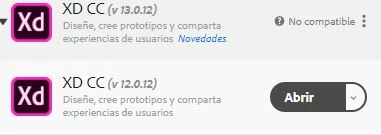
CapturaXD.JPG

1.3K
Translate
Report
Community guidelines
Be kind and respectful, give credit to the original source of content, and search for duplicates before posting. Learn more
community guidelines

correct answers 1 Correct answer

Adobe Employee , Oct 22, 2018 Oct 22, 2018

Thank you for trying. I suggest getting in touch with our tech support team using this link Contact Customer Care

Do let them know of the troubleshooting you have done so far to avoid an repetition.

Thanks,

Preran

Translate
Adobe Employee ,
Oct 18, 2018 Oct 18, 2018

Hi Danielp,

Sorry that you are unable to install Adobe XD 13 on your machine. I would request you to close Adobe Creative Cloud and check if it's running in Compatibility mode or not. If yes, please uncheck that box and relaunch Adobe Creative Cloud.

Please check this gif for more information: -

Change Compatibility mode.gif

Please update this discussion with the results.

Thanks,

Atul_Saini

Translate
Report
Community guidelines
Be kind and respectful, give credit to the original source of content, and search for duplicates before posting. Learn more
community guidelines
New Here ,
Oct 18, 2018 Oct 18, 2018

hello, no ... i have not been able to install adobe XD 13 because the "not compatible" does not give me option to install, no button appears only that message appears, and in the executable of Creative Could the compatibility options they are unmarked

Translate
Report
Community guidelines
Be kind and respectful, give credit to the original source of content, and search for duplicates before posting. Learn more
community guidelines
Adobe Employee ,
Oct 19, 2018 Oct 19, 2018

Daniel,

Can you check if you have any pending windows update? If so, please update it and then check.

Do report back with your results.

RegardsArpit

Translate
Report
Community guidelines
Be kind and respectful, give credit to the original source of content, and search for duplicates before posting. Learn more
community guidelines
New Here ,
Oct 20, 2018 Oct 20, 2018

everything is updated in my OS

Translate
Report
Community guidelines
Be kind and respectful, give credit to the original source of content, and search for duplicates before posting. Learn more
community guidelines
Adobe Employee ,
Oct 22, 2018 Oct 22, 2018
LATEST

Thank you for trying. I suggest getting in touch with our tech support team using this link Contact Customer Care

Do let them know of the troubleshooting you have done so far to avoid an repetition.

Thanks,

Preran

Translate
Report
Community guidelines
Be kind and respectful, give credit to the original source of content, and search for duplicates before posting. Learn more
community guidelines