
Participant
January 9, 2020
Answered

[Panel]-Unable to Sync CC Libraries in XD - just blurred preview

  • January 9, 2020
  • 1 reply
  • 1063 views

I'm currently unable to enable CC Library syncing in Adobe XD. As a result any library asset that I try and import into XD just displays as a blurred preview (that requests refreshing).
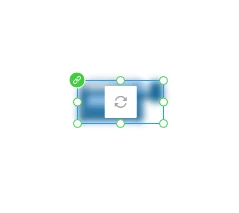
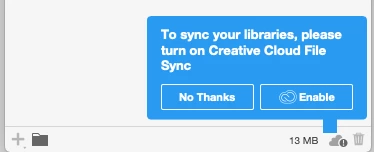


When I click the 'Enable' nothing happens. My syncing preferences ARE enabled in CC though, and I can preview any library folders/assets I've created there. 


I'm using the current XD version (25.1.12). which I've tried reinstalling.


Any advice would be most appreciated. I've read other threads regarding connection issues with CC/XD Libraries, but I'm not getting a network error. Thanks in advance.  


<The Title was renamed by moderator>


This topic has been closed for replies.
Correct answer DJS-SM

Thanks Chad


CC desktop was running and I was able to sync Libraries in other applications - but it seems the good old fashioned reboot has done the trick for getting XD to sync correctly.


1 reply

hammer0909
Community Expert
Community Expert
January 9, 2020

The icon in your screen shot seems to elude to the fact that your Creative Cloud Files and Libraries aren't syncing. I'd check the following.


  • Make sure that your Creative Cloud desktop appliction is running. In the upper right corner of the CC Desktop window, you'll see a cloud file and clicking on it will show you if the files are syncing.
  • Try quiting the Creative Cloud Desktop application and relaunching it.
  • From here we need to dive a bit deeper. There are some background processes that run on your computer that can typically be seen in the Activity monitor (Mac) or Process Manager (Windows). Quitting CC desktop and killing some of those processes and then relaunching CC desktop has helped me in the past but honestly a good old fashioned computer reboot works as well.


Let us know if this helps.

DJS-SMAuthorCorrect answer
Participant
January 10, 2020

Thanks Chad


CC desktop was running and I was able to sync Libraries in other applications - but it seems the good old fashioned reboot has done the trick for getting XD to sync correctly.


HARSHIKA_VERMA
Community Manager
Community Manager
January 10, 2020

We are glad to hear you are back on track. Please feel free to reach out to us in the future for any query related to Adobe XD. We would be happy to help.


Thank you Chad for your contribution on this post. We really appreciate your presence on the community.


Thanks,

Harshika