

sarahpeller
Known Participant
September 1, 2022
Answered

Resizing in XD? Why is this so hard?

  • September 1, 2022
  • 1 reply
  • 2842 views

I must be missing something obvious here because this seems strangely hard to achieve what I want... I'm really new to XD, but have many years of PS, AI & ID experience.


I created a group, then a component in XD. It's attached here. I made these components a little too large on the page, and I want to them all to be smaller. So, I select the component or components and try to resize. But when resizing, it seems to be using responsive resize and I end up with a jumbled mess (attached) instead of the entire component or group just getting resized as it does in Photoshop, for instance.


What am I doing wrong? How do I turn off responsive resize and resize as I'd like to?


    This topic has been closed for replies.
    Correct answer Dan Rodney

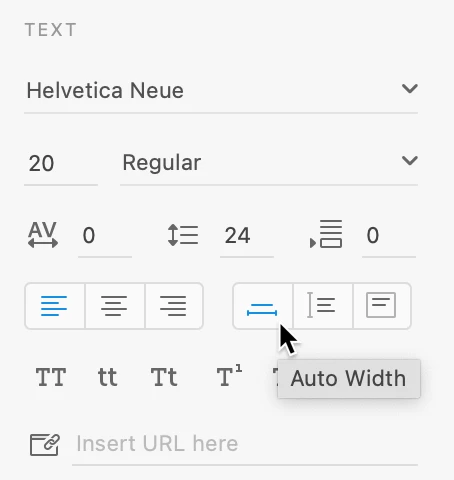
    I think you're making Fixed Size text boxes rather than the Auto Width text boxes you want. For single lines of text, click when making text, DO NOT drag. Dragging creates a fixed size text box, clicking creates an Auto Width. Fixed Size cannot be scale, but Auto Width can!


    To change a text frame after you've made it, click here:


    If you'd like to see Fixed Size text be able to be scaled, there's a feature request for that. Scale text area – Adobe XD Feedback : Feature Requests & Bugs 

    1 reply

    AkinGn
    Community Expert
    Community Expert
    September 1, 2022

    Hi @sarahpeller, you can find a toggle switch on the right sidebar, under the "Layout" section to toggle responsive resize (as seen in this video https://youtu.be/Nxi2kBF7uiQ?t=48 ) Hope this helps!

    sarahpeller
    Known Participant
    September 12, 2022

    I would like to make the whole group smaller, as you can resize in photoshop or illustrator. Whether I have responsive resize on or off doesn't seem to help with this. Here is a screen recording that I took. I'm just trying to make this button smaller, but when I resize, the whole thing gets scrambled. I tried toggling the button, but no change.

    Dan Rodney
    Community Expert
    Community Expert
    September 12, 2022

    I think you're making Fixed Size text boxes rather than the Auto Width text boxes you want. For single lines of text, click when making text, DO NOT drag. Dragging creates a fixed size text box, clicking creates an Auto Width. Fixed Size cannot be scale, but Auto Width can!


    To change a text frame after you've made it, click here:


    — Adobe Certified Expert & Instructor at Noble Desktop | Web Developer, Designer, InDesign Scriptor